<?xml version="1.0" encoding="utf-8"?>
<?xml-stylesheet href="/feeds/atom-style.xsl" type="text/xsl"?>
<feed xmlns="http://www.w3.org/2005/Atom">
    <id>https://wwww.aprdec.top/</id>
    <title>Aprdec's Blog</title>
    <updated>2026-05-26T09:27:38.011Z</updated>
    <generator>Astro-Theme-Retypeset with Feed for Node.js</generator>
    <author>
        <name>Aprdec</name>
        <uri>https://wwww.aprdec.top/</uri>
    </author>
    <link rel="alternate" href="https://wwww.aprdec.top/"/>
    <link rel="self" href="https://wwww.aprdec.top/atom.xml"/>
    <subtitle>Aprdec的一些碎碎念</subtitle>
    <rights>Copyright © 2026 Aprdec</rights>
    <entry>
        <title type="html"><![CDATA[今天午餐有一道木耳炒肉]]></title>
        <id>https://wwww.aprdec.top/posts/%E4%BB%8A%E5%A4%A9%E5%8D%88%E9%A4%90%E6%9C%89%E4%B8%80%E9%81%93%E6%9C%A8%E8%80%B3%E7%82%92%E8%82%89/</id>
        <link href="https://wwww.aprdec.top/posts/%E4%BB%8A%E5%A4%A9%E5%8D%88%E9%A4%90%E6%9C%89%E4%B8%80%E9%81%93%E6%9C%A8%E8%80%B3%E7%82%92%E8%82%89/"/>
        <updated>2026-05-15T00:00:00.000Z</updated>
        <summary type="html"><![CDATA[今天午餐,发现餐厅多了一道木耳炒肉,还有蒜苗,我夹了很多. 感觉很久没有吃到木耳炒肉这个菜了,自从出来工作之后.以前放暑假,老妈最擅长做的就...]]></summary>
        <content type="html"><![CDATA[<p>今天午餐,发现餐厅多了一道木耳炒肉,还有蒜苗,我夹了很多.</p>
<p>感觉很久没有吃到木耳炒肉这个菜了,自从出来工作之后.以前放暑假,老妈最擅长做的就是木耳炒肉,蒜苗炒肉,洋葱炒肉....</p>
<p>其实因为做法简单,只需要提前把肉炒好放冰箱冻起来,用的时候炒好配菜再加入提前做好的肉就好了.</p>
<p>但是味道确实好吃,可能我吃习惯了,虽然以前在家总是说老妈不更新菜谱,来来回回就那几样,但是今天在餐厅看到这道菜,还真是怀念.</p>
<p>但是似乎能吃到老妈做的菜的机会越来越少了,出来工作一年了,只有国庆和过年我才回去,去年国庆回去因为都是举办婚礼的竟然没有吃到老妈做的一顿午餐.</p>
<p>我是家里老二,今年才23但是父母已经快60了.什么时候才能成家立业回去陪伴父母呢?且不论能不能成家立业,即使可以小有成就我想那时我也40了吧.</p>
<p>那父母已经80了.</p>
<p>哎,很多话在编辑器上增增减减,打上去又退回来.</p>
<p>想起父母的年龄,似乎还是小时候的数字-43.我不知道为什么对这个数字这么印象深刻,但是爸妈就是慢慢的从40变成了快60了.</p>
<p>有什么变化吗?老爸逐渐头发变成了全白,老妈脸上开始有了老年斑,似乎除此之外也没有什么变化了.</p>
<p>哥哥结婚,彩礼三金房子车子等等让爸妈头疼,哥哥也头疼.</p>
<p>二人何时能享福呢?我的婚姻似乎还很远又似乎很近,我经常对爸妈说你们的钱不要为我打算了,你们享受享受吧.我希望我的婚姻我可以自己解决,但是爸妈还是做着支持我的准备.</p>
<p>想想他们的一生,年轻时不提,自我有意识时,家里买了车子,买了房子,终于把债务还完了,两个孩子都上完了学去工作了,又要准备孩子结婚的钱了.忙忙碌碌.</p>
<p>或许到我这一代观念变化了,我希望他们能为自己考虑.我运气不错毕业后就有了一个挺好的工作,不用啃老也能偶尔给爸妈一点钱.但是想到他们有一天会老去,会行动变慢,思考变缓我就难以抑制的伤心.</p>
<p>真希望可以有大把的时间陪在他们身边.</p>
]]></content>
        <author>
            <name>Aprdec</name>
            <uri>https://wwww.aprdec.top/</uri>
        </author>
        <published>2026-05-15T00:00:00.000Z</published>
    </entry>
    <entry>
        <title type="html"><![CDATA[做了一个APP,叫BiliMusic]]></title>
        <id>https://wwww.aprdec.top/posts/%E4%B8%80%E4%B8%AA%E9%9F%B3%E4%B9%90app%E7%9A%84%E8%AF%9E%E7%94%9F/</id>
        <link href="https://wwww.aprdec.top/posts/%E4%B8%80%E4%B8%AA%E9%9F%B3%E4%B9%90app%E7%9A%84%E8%AF%9E%E7%94%9F/"/>
        <updated>2026-04-08T00:00:00.000Z</updated>
        <summary type="html"><![CDATA[顾名思义,这是一个B站源音乐APP. 仓库地址:AprDeci/bili-music 一直想写一个音乐APP,也算是实现了吧. 现在在做we...]]></summary>
        <content type="html"><![CDATA[<h1>做了一个APP,叫BiliMusic</h1>
<p>顾名思义,这是一个B站源音乐APP.</p>
<p>仓库地址:<a href="https://github.com/AprDeci/bili-music">AprDeci/bili-music</a></p>
<p><img src="./_image/biliMusicShowcase.jpg" alt="biliMusicShowcase" /></p>
<p>一直想写一个音乐APP,也算是实现了吧.</p>
<h2>25.4.16</h2>
<p>现在在做webdav存储功能.</p>
<p>我发现很多功能还真是不好做,譬如目前有两个BUG我根本无从解决</p>
<ul>
<li>收藏页进入player页 返回 会直接退出收藏</li>
<li>与其他应用同时播放-抖音开启后会降低音乐关闭后不会再回到原来音量</li>
</ul>
<p>一个应该是gorouter的BUG,拦截手势也无用.</p>
<p>一个是抖音关闭后不知道该如何捕获到这个回调.</p>
<p>已经37star了,刚刚看了一下v1.2.0下载量有88,真是让我惶恐.</p>
<h2>25.5.6</h2>
<p>桌面端也写了 下一步是把metingapi去掉,用dart重写吧
还有收藏夹的改进和内存优化.</p>
]]></content>
        <author>
            <name>Aprdec</name>
            <uri>https://wwww.aprdec.top/</uri>
        </author>
        <published>2026-04-08T00:00:00.000Z</published>
    </entry>
    <entry>
        <title type="html"><![CDATA[哦？博客变样子了]]></title>
        <id>https://wwww.aprdec.top/posts/%E5%93%A6%E5%8D%9A%E5%AE%A2%E5%8F%98%E6%A0%B7%E5%AD%90%E4%BA%86/</id>
        <link href="https://wwww.aprdec.top/posts/%E5%93%A6%E5%8D%9A%E5%AE%A2%E5%8F%98%E6%A0%B7%E5%AD%90%E4%BA%86/"/>
        <updated>2026-03-11T00:00:00.000Z</updated>
        <summary type="html"><![CDATA[其实我对wordpress颇有微词.它固然很好,但是错就错在我不会PHP,我也懒得学,简单的改下主题当然可以,但是想增强功能什么的,那很难了...]]></summary>
        <content type="html"><![CDATA[<h1>哦?博客变样子了</h1>
<p>其实我对wordpress颇有微词.它固然很好,但是错就错在我不会PHP,我也懒得学,简单的改下主题当然可以,但是想增强功能什么的,那很难了.(不会用AI去完全vibe coding的)</p>
<p>astro似乎刚出的时候我就关注了,但是一直没有使用,也曾有心想尝试一下是否把sakura主题迁移到astro来,但是工作量还是很大,我也是个懒人,一直没有开工,而且原来的博客耕耘多年,该优化的该调整的全都做的差不多了.也没什么迁移的必要.</p>
<p>这几天公司事情不多,索性看一看astro的文档,跟着写了写,了解了大致的内容,看一看有没有不错的主题模板,可以让我借鉴以下的,最新模板的第二个就是我现在fork的主题:</p>
<p><a href="https://github.com/0xdres/astro-devosfera">0xdres/astro-devosfera: A Terminal/Cyberpunk blog theme built on AstroPaper. Global ⌘K search, image galleries with lightbox, custom typography, cursor glow effects, and a glassmorphism UI</a></p>
<p>看了一下真的很漂亮,而且我也想尝试一下简约的博客,很多人对二次元要素过多的博客比较鄙夷.</p>
<p>查看了一下,动效简单丰富,有tags,有搜索,有画廊(标重点).</p>
<p>使用wordpress的时候一直想搞一个相册页面,保存一下生活中的点滴,但是不会PHP导致一直没有开工.现在好了,现成的也有了,而且技术栈我很熟悉,没有的我再加好了.</p>
<p>索性用一下午开始尝试做汉化,直接大改成了多语言,没错,博客有英文UI版本,但是内容还没有做.</p>
<p>之后又修复了一些CSS问题.这时候已经改的特别多了,索性fork出来做一个独立的仓库吧,也不提交PR了,感觉改动太大.</p>
<p><a href="https://github.com/AprDeci/astro-devosfera">AprDeci/astro-devosfera: A Terminal/Cyberpunk blog theme built on AstroPaper. Global ⌘K search, image galleries with lightbox, custom typography, cursor glow effects, and a glassmorphism UI</a></p>
<p>又添加了评论,友链等等,还把画廊改成了瀑布流.嗯,就这是现在对博客做的修改了.</p>
<h2>edgeone function的使用</h2>
<p><strong>该功能不在模板内</strong></p>
<p>在查找灵感的时候,看到别人的博客有友链提交的功能,但是现在的博客是静态的,感觉是没戏了,突然想到现在的博客部署在腾讯云edgeone Page上,一直没用过function功能,不知道能不能搞一搞,之前也没用过vercel或者cloudflare上的function,索性这次就尝试一下.</p>
<p>过程出乎意料的顺利,加上有AI,很快就把提交友链搞定了,不得不感慨时代的进步,在21年刚刚建立博客的时候,似乎serverless服务也才刚刚起步?那时候想做一个类似功能的博客,有一个服务器我想是必然的吧,但是现在云厂商搞定了一切.而且以后拓展也很方便.</p>
<p>这次博客的变化,当作是我人生新阶段的一个印记吧,希望工作顺利.</p>
]]></content>
        <author>
            <name>Aprdec</name>
            <uri>https://wwww.aprdec.top/</uri>
        </author>
        <published>2026-03-11T00:00:00.000Z</published>
    </entry>
    <entry>
        <title type="html"><![CDATA[我写了一个四六级在线真题网站Onepractice]]></title>
        <id>https://wwww.aprdec.top/posts/%E6%88%91%E5%86%99%E4%BA%86%E4%B8%80%E4%B8%AA%E5%9B%9B%E5%85%AD%E7%BA%A7%E5%9C%A8%E7%BA%BF%E7%9C%9F%E9%A2%98%E7%BD%91%E7%AB%99onepractice/</id>
        <link href="https://wwww.aprdec.top/posts/%E6%88%91%E5%86%99%E4%BA%86%E4%B8%80%E4%B8%AA%E5%9B%9B%E5%85%AD%E7%BA%A7%E5%9C%A8%E7%BA%BF%E7%9C%9F%E9%A2%98%E7%BD%91%E7%AB%99onepractice/"/>
        <updated>2026-01-13T00:00:00.000Z</updated>
        <summary type="html"><![CDATA[网站地址: https://www.onepractice.top 这个想法最初是在我在大学的时候经常在平板上用笔记软件写英语试卷,但是我的...]]></summary>
        <content type="html"><![CDATA[<h1>我写了一个四六级在线真题网站Onepractice</h1>
<p><strong>网站地址:</strong> https://www.onepractice.top</p>
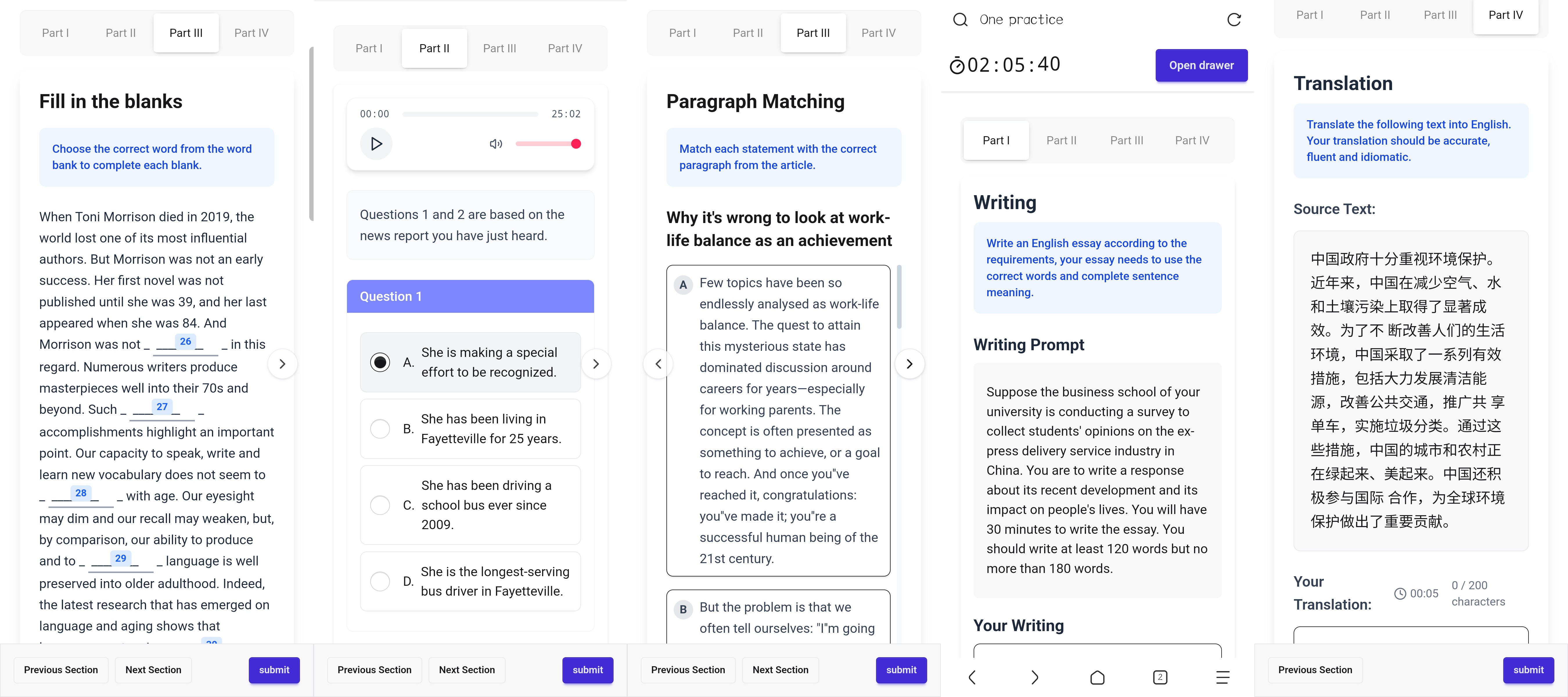
<p>这个想法最初是在我在大学的时候经常在平板上用笔记软件写英语试卷,但是我的11寸屏幕需要经常的缩放和移动pdf位置,并且在做一些题型的时候需要左右来回翻,对答案的时候也不方便,所以我为什么不能做一个网页来做题呢,组件都是按照我的设想来实现,不同类型题目不同组件.</p>
<p>昨天我在我的日本服务器上部署了后端,前端用vercel先搭建了一版(也是为了找工作先让HR看看),如果你看到了这篇文章并且有四六级需求,欢迎尝试,并且提出建议.</p>
<p>未来将会:时长记录,单词查询,数据分析,支持考研试卷.</p>
<p>(横屏效果更佳)</p>
<p><img src="https://luchetuchuang.oss-cn-beijing.aliyuncs.com/aprimg/%E5%85%B6%E4%BD%99%E9%A1%B5%E9%9D%A2.jpg" alt="其余页面" /><img src="https://luchetuchuang.oss-cn-beijing.aliyuncs.com/aprimg/%E8%AF%95%E5%8D%B7%E9%A1%B5%E9%9D%A2.jpg" alt="试卷页面" /></p>
]]></content>
        <author>
            <name>Aprdec</name>
            <uri>https://wwww.aprdec.top/</uri>
        </author>
        <published>2026-01-13T00:00:00.000Z</published>
    </entry>
    <entry>
        <title type="html"><![CDATA[通关《夏日口袋》后的感受]]></title>
        <id>https://wwww.aprdec.top/posts/%E9%80%9A%E5%85%B3%E5%A4%8F%E6%97%A5%E5%8F%A3%E8%A2%8B%E5%90%8E%E7%9A%84%E6%84%9F%E5%8F%97/</id>
        <link href="https://wwww.aprdec.top/posts/%E9%80%9A%E5%85%B3%E5%A4%8F%E6%97%A5%E5%8F%A3%E8%A2%8B%E5%90%8E%E7%9A%84%E6%84%9F%E5%8F%97/"/>
        <updated>2025-12-07T00:00:00.000Z</updated>
        <summary type="html"><![CDATA[哈哈哈,起这么个名字,让我想到了小学写各种读后感作文. 这是我第一次玩galgame,之前我一直以为galgame就是无脑的点点点,看看剧情...]]></summary>
        <content type="html"><![CDATA[<h1>通关《夏日口袋》有感</h1>
<p>哈哈哈,起这么个名字,让我想到了小学写各种读后感作文.</p>
<p>这是我第一次玩galgame,之前我一直以为galgame就是无脑的点点点,看看剧情.我之前从不理解为什么很多人喜欢玩galgame,直到我玩了我人生的第一个galgame------《summer pocket RB》</p>
<p>我是电子阳痿了玩游戏不想动脑子,不想操作,所以寻思找一个galgame玩玩吧.没想到,后劲这么大.</p>
<h2>八条线感想</h2>
<p>我按照我的游玩顺序来讲一讲每一条线我的感受吧</p>
<h3>共通线</h3>
<p>玩共通线的时候,新奇感包裹着我,我的体验感觉很不错,因为我玩游戏其实也很乐意与看剧情,共通线的剧情给我感觉很愉快,青春气息扑面而来,几位角色也让我很喜欢,不论是八位女生还是羽依里的两个好基友.</p>
<p>来武汉工作了半年了,下班后每天晚上呆在卧室里也挺无聊,挺寂寞的.</p>
<h3>海未(羽未)线</h3>
<p>我是做了攻略再来玩的,所以我知道前期要先推了海未线.</p>
<p>玩海未线的时候,我没有那么的感动,感觉很温馨吧,因为这条线是海未的童子军故事,更多的是亲情方面的,也没有人死,没人失忆,没人消失,所以我觉得就是很温馨.(此时,我还不知道我之后将要面对的是什么)</p>
<h2>鸥线</h2>
<p>哭+1</p>
<p>本来我看别人评论,寻思一个游戏能多感动,看网上说的这么玄乎.</p>
<p>我很喜欢鸥的外形,性格也很开朗所以我选择了第二条推鸥线(后来才发现最好后期再推),</p>
<p>前期玩的时候,哇,感觉自己又恋爱了,我想,这就是gal的意义吧,让我感到一个人离家,但是却有一个黑长直,黄金瞳小姐姐陪伴我,我们一起冒险,寻找钥匙,最后一起去找寻宝藏.</p>
<p>结果后期突然消失了,搞得我也有点不知所措.</p>
<p>后面得知鸥的故事,发现她已经得了绝症,我感到心痛,虽然最后给了一个开放式结局,但我还是很难过,不给我一个确定性的结局,我一直会觉得鸥已经去世了.</p>
<h2>静久线</h2>
<p>哭 + 1</p>
<p>第三条打的静久线.不知道为什么我很喜欢静久(好吧,我玩一条线爱上一个.),可能我很希望有一个知性姐姐型的女朋友吧.</p>
<p>这条线细细想来剧情是不如其他线,后期讲的有点云里雾里,不过感动还是显而易见的.</p>
<p>玩这条线的那晚,讲到发现静久会失忆的时候,搭配游戏的BGM,给了我一种心理恐怖的感觉,玩个gal玩的不敢玩了..</p>
<p>不过fine了,结局是好的就行,我没打be结局,我怕我受不了.而且最后的CG真的很好,静久和漫天的便签站立在草原上,真是美好啊.</p>
<h3>苍线</h3>
<p>哭 n+1</p>
<p>其实玩到这里我才算对主线有了一点认识,毕竟前三条线对蝴蝶的涉及其实都比较浅,我只是知道有一些玄幻的设定,具体是什么还不清楚.</p>
<p>苍线我感觉真的很好,苍昏迷的时候我不禁跟着羽依里流泪,多希望她不要睡去,再坚持一下.</p>
<p>好结局,不是开放式很好,我讨厌开放式结局.最后苍能醒来真的很好.</p>
<p>苍真的很漂亮.</p>
<p><img src="https://luchetuchuang.oss-cn-beijing.aliyuncs.com/img/PixPin_2025-11-10_19-07-20.jpg" alt="PixPin_2025-11-10_19-07-20" /></p>
<h3>识线</h3>
<p>哭+1</p>
<p>其实前期对识感触不深,前期感觉太闹腾了,尖叫声太多了.</p>
<p>但是玩到中后期剧情步入正轨后,越发对识不得不离开感到痛心.</p>
<p>玩到最后,本以为两个人奇迹再现又见面了,没想到直接剧情杀了,不是,掉入海里又捞上来就死了吗?也没说有什么外伤.</p>
<p>哎,唯有牢识的结局一点余地没有.</p>
<h3>美希线</h3>
<p>美希线结局很好,其实这是我觉得最圆满的一个结局了,没有任何人出事,而且美希也很可爱,我觉得CG画的很漂亮,动画画的头发就太短了.</p>
<p>整个剧情我感觉挺甜的,做的几个梦也挺搞笑的.</p>
<h3>紬线</h3>
<p>这个没啥说的,哭就完事咧. 哭 N+9</p>
<p>给我玩的眼泪哗哗的,紬和A线是我哭的最多的了,其他线也哭,但是这两条线给我的感情冲击更甚一筹.</p>
<p>最后二人在烛光下,紬变成了小熊,羽依里站那里流泪,哎呀,我简直就是羽依里啊,我在屏幕前跟着哭.</p>
<p>不过好结局捏,最后也是回来了,这就很棒</p>
<h3>白羽线</h3>
<p>嗯,很有趣很日常的线吧,两个人最终在一起很甜.</p>
<p>我本来对白羽真的无感,我不喜欢冷淡的人,白羽在紬线对羽依里实在谈不上好.</p>
<p>不过白羽线还是解释了为什么那么冷淡,玩着玩着我就变心了~,真是个温柔体贴的好女孩啊.</p>
<h3>A线,P线</h3>
<p>哎,我不想再说什么了,A线很刀但P线最终圆满让我很开心.</p>
<p>玩完之后我感到一阵空虚.游戏里的人在那70h就好像我真正的朋友,可惜他们都在另一个世界.</p>
<p>想到这里,我就有一些心痛.</p>
]]></content>
        <author>
            <name>Aprdec</name>
            <uri>https://wwww.aprdec.top/</uri>
        </author>
        <published>2025-12-07T00:00:00.000Z</published>
    </entry>
    <entry>
        <title type="html"><![CDATA[WSL+AMD ROCM 运行IndexTTS2]]></title>
        <id>https://wwww.aprdec.top/posts/wslamd-rocm-%E8%BF%90%E8%A1%8Cindextts2/</id>
        <link href="https://wwww.aprdec.top/posts/wslamd-rocm-%E8%BF%90%E8%A1%8Cindextts2/"/>
        <updated>2025-11-12T00:00:00.000Z</updated>
        <summary type="html"><![CDATA[工作后组装了新电脑,在显卡的选择上犹豫再三,rtx5070,rtx5070ti,rx9070xt,想要N卡但是70ti略贵70显存小,907...]]></summary>
        <content type="html"><![CDATA[<h1>WSL+AMD ROCM 运行IndexTTS2</h1>
<h2>前言</h2>
<p>工作后组装了新电脑,在显卡的选择上犹豫再三,rtx5070,rtx5070ti,rx9070xt,想要N卡但是70ti略贵70显存小,9070xt很好但是没有CUDA.最终还是选择了性价比.</p>
<p>ROCM我也一直在关注,感觉越来越好了呢.</p>
<p>这次教程主要还是会讲原理,其实就是把依赖的pytorch修改成rocm适配的pytorch,并且加入一些其他操作即可.</p>
<p>我想现在rocm7出来了应该在<strong>windows上原生运行</strong>是没问题的,都是通用的,大家可以试试.</p>
<h2>环境列表</h2>
<table>
<thead>
<tr>
<th>环境</th>
<th>版本</th>
</tr>
</thead>
<tbody>
<tr>
<td>系统</td>
<td>wsl2 ubuntu24</td>
</tr>
<tr>
<td>Rocm</td>
<td>6.4</td>
</tr>
<tr>
<td>pytorch</td>
<td>2.6</td>
</tr>
</tbody>
</table>
<p>emm,其实感觉也没什么特别要列出来的,环境应该不是特定的只要保证ROCM和pytorch的版本对应即可</p>
<h2>正式教程</h2>
<h3>克隆indextts2 准备环境</h3>
<p>这一步很简单,跟随官方仓库Readme就可以了,我不再多赘述</p>
<pre><code>git lfs install
</code></pre>
<pre><code>git clone https://github.com/index-tts/index-tts.git &amp;&amp; cd index-tts
git lfs pull  # download large repository files
</code></pre>
<p>安装uv</p>
<p><a href="https://uv.doczh.com/getting-started/installation/">安装 | uv 中文文档</a></p>
<h2>Ubuntu安装ROCM</h2>
<p>这里就是按照官方教程安装,我只是复述一遍,原文在下</p>
<p><a href="https://rocm.docs.amd.com/projects/radeon-ryzen/en/latest/docs/install/installrad/wsl/install-radeon.html">Install Radeon software for WSL with ROCm — Use ROCm on Radeon and Ryzen</a></p>
<p><strong>安装 AMD 统一驱动程序软件包存储库和安装脚本</strong></p>
<pre><code>sudo apt update
wget https://repo.radeon.com/amdgpu-install/6.4.2.1/ubuntu/noble/amdgpu-install_6.4.60402-1_all.deb
sudo apt install ./amdgpu-install_6.4.60402-1_all.deb
</code></pre>
<pre><code>amdgpu-install -y --usecase=wsl,rocm --no-dkms
</code></pre>
<p><strong>安装后验证检查</strong></p>
<pre><code>rocminfo
</code></pre>
<p>如果能正确打印你的显卡信息就是安装完成了</p>
<h2>修改pyproject.toml</h2>
<p>这一步就是最关键的,我们要修改依赖中的torch依赖和其他依赖信息</p>
<p><strong>下载torch wheel</strong></p>
<p>rocm使用的pytorch是amd官方修改过的,所以我们要单独的下载下来再安装,indexTTS不需要torchvision所以我们不下载(更多版本下载地址看下面链接的仓库就可以了https://repo.radeon.com/rocm)</p>
<pre><code>wget https://repo.radeon.com/rocm/manylinux/rocm-rel-6.4.2/torch-2.6.0%2Brocm6.4.2.git76481f7c-cp312-cp312-linux_x86_64.whl
wget https://repo.radeon.com/rocm/manylinux/rocm-rel-6.4.2/pytorch_triton_rocm-3.2.0%2Brocm6.4.2.git7e948ebf-cp312-cp312-linux_x86_64.whl
wget https://repo.radeon.com/rocm/manylinux/rocm-rel-6.4.2/torchaudio-2.6.0%2Brocm6.4.2.gitd8831425-cp312-cp312-linux_x86_64.whl
</code></pre>
<p>然后修改pyproject.toml. 首先是python版本修改</p>
<p>requires-python = "==3.12.*"</p>
<p>然后是依赖,修改numba适配python3.12,修改torch安装为本地安装</p>
<p><img src="https://luchetuchuang.oss-cn-beijing.aliyuncs.com/img/image-20251031225904743.png" alt="image-20251031225904743" /></p>
<p>将以下部分注释掉或者删掉</p>
<pre><code>[tool.uv.sources]
# Install PyTorch with CUDA support on Linux/Windows (CUDA doesn't exist for Mac).
# NOTE: We must explicitly request them as `dependencies` above. These improved
# versions will not be selected if they're only third-party dependencies.
torch = [
  { index = "pytorch-cuda", marker = "sys_platform == 'linux' or sys_platform == 'win32'" },
]
torchaudio = [
  { index = "pytorch-cuda", marker = "sys_platform == 'linux' or sys_platform == 'win32'" },
]
torchvision = [
  { index = "pytorch-cuda", marker = "sys_platform == 'linux' or sys_platform == 'win32'" },
]
</code></pre>
<p>结尾添加如下</p>
<pre><code>
[tool.hatch.metadata]

allow-direct-references = true
</code></pre>
<p>最后修改如下</p>
<p><img src="https://luchetuchuang.oss-cn-beijing.aliyuncs.com/img/image-20251031225226462.png" alt="image-20251031225226462" /></p>
<h2>安装依赖</h2>
<pre><code>uv venv
</code></pre>
<pre><code>uv sync --all-extras
</code></pre>
<p>如果是国内用户</p>
<pre><code>uv sync --all-extras --default-index "https://mirrors.aliyun.com/pypi/simple"

uv sync --all-extras --default-index "https://mirrors.tuna.tsinghua.edu.cn/pypi/web/simple"
</code></pre>
<p><strong>这时候你可以运行如下命令检测程序是否可以检测到gpu</strong></p>
<pre><code>uv run tools/gpu_check.py
</code></pre>
<p>下载模型</p>
<pre><code>uv tool install "huggingface-hub[cli,hf_xet]"

hf download IndexTeam/IndexTTS-2 --local-dir=checkpoints
</code></pre>
<p>或</p>
<pre><code>uv tool install "modelscope"

modelscope download --model IndexTeam/IndexTTS-2 --local_dir checkpoints
</code></pre>
<p><strong>如果你是wsl还需要做下面一步(要在虚拟环境里哦)</strong></p>
<pre><code>location=$(pip show torch | grep Location | awk -F ": " '{print $2}')
cd ${location}/torch/lib/
rm libhsa-runtime64.so*
</code></pre>
<p>以上,就是所有操作了,当你下载完依赖和模型就可以运行以下命令启动了!</p>
<pre><code>uv run webui.py
</code></pre>
<p>或</p>
<pre><code>uv run webui.py --fp16
</code></pre>
<h2>常见问题</h2>
<p>如果你遇到了生成很慢,并且提示</p>
<pre><code>MIOpen(HIP): Warning [IsEnoughWorkspace] [GetSolutionsFallback WTI] Solver &lt;GemmFwdRest&gt;, workspace required: 37527552, provided ptr: 0 size: 0
</code></pre>
<p>你可以尝试如下命令,亲测有效</p>
<pre><code>export MIOPEN_FIND_MODE=FAST
export MIOPEN_USER_DB_PATH="~/tts/miopen_cache"
</code></pre>
<p>(来源:[<a href="https://github.com/pytorch/pytorch/issues/150168">ROCm] PyTorch 在 TTS 上运行缓慢 · 问题 #150168 · pytorch/pytorch --- [ROCm] PyTorch slow on TTS · Issue #150168 · pytorch/pytorch</a>)</p>
<h2>结尾</h2>
<p>最后来一张实测图</p>
<p><img src="https://luchetuchuang.oss-cn-beijing.aliyuncs.com/img/image-20251031231007601.png" alt="image-20251031231007601" /></p>
]]></content>
        <author>
            <name>Aprdec</name>
            <uri>https://wwww.aprdec.top/</uri>
        </author>
        <published>2025-11-12T00:00:00.000Z</published>
    </entry>
    <entry>
        <title type="html"><![CDATA[写了一个微信阅读摸鱼软件]]></title>
        <id>https://wwww.aprdec.top/posts/%E5%86%99%E4%BA%86%E4%B8%80%E4%B8%AA%E5%BE%AE%E4%BF%A1%E9%98%85%E8%AF%BB%E6%91%B8%E9%B1%BC%E8%BD%AF%E4%BB%B6/</id>
        <link href="https://wwww.aprdec.top/posts/%E5%86%99%E4%BA%86%E4%B8%80%E4%B8%AA%E5%BE%AE%E4%BF%A1%E9%98%85%E8%AF%BB%E6%91%B8%E9%B1%BC%E8%BD%AF%E4%BB%B6/"/>
        <updated>2025-09-28T00:00:00.000Z</updated>
        <summary type="html"><![CDATA[这几天上班任务不是特别多,所以就想要看会《败犬女主》小说. 先查看了一下市面上有的摸鱼软件,使用了几款,感觉其实都还不错,但是因为核心都是作...]]></summary>
        <content type="html"><![CDATA[<h1>写了一个微信阅读摸鱼软件..</h1>
<p>这几天上班任务不是特别多,所以就想要看会《败犬女主》小说.</p>
<p>先查看了一下市面上有的摸鱼软件,使用了几款,感觉其实都还不错,但是因为核心都是作者手搓的,有的不支持epub,有的则用着不顺手,更重要的是有一个通病----所有应用都不支持跨端同步</p>
<p>当然,一个摸鱼软件要什么跨端同步呢,只是我想要回家接着在手机上看,所以我看看了所有小说软件,很遗憾没能找到支持同步并且支持摸鱼模式的.</p>
<p>看了会论坛上的相关帖子,看到有人提及 Utools的摸鱼插件支持微信读书,这忽然提醒了我,微信读书还是特别好的,也能同步,格式支持也好.于是我尝试了一下Utools和另外一个号称支持微信阅读的摸鱼软件,很遗憾,两个都收费,而且支持的说实话也一般.</p>
<p>我浏览下微信阅读的网页,感觉做的很好,功能很齐全,心想要是能把网页做成应用就好了.</p>
<p>欸?网页做成应用,我忽然想到了一个项目----[Pake](<a href="https://github.com/tw93/Pake">tw93/Pake: 🤱🏻 Turn any webpage into a desktop app with one command. 🤱🏻 一键打包网页生成轻量桌面应用。</a>),而且我知道Pake可以注入js和css,并且tauri也能提供很强的自定义功能!</p>
<p>说干就干,花了一天时间,写成了现在的软件,WxReader-fish,贴一下仓库地址:</p>
<p>[AprDeci/WxReader-fish](<a href="https://github.com/AprDeci/WxReader-fish">AprDeci/WxReader-fish: 基于Pake的微信阅读摸鱼应用</a>)</p>
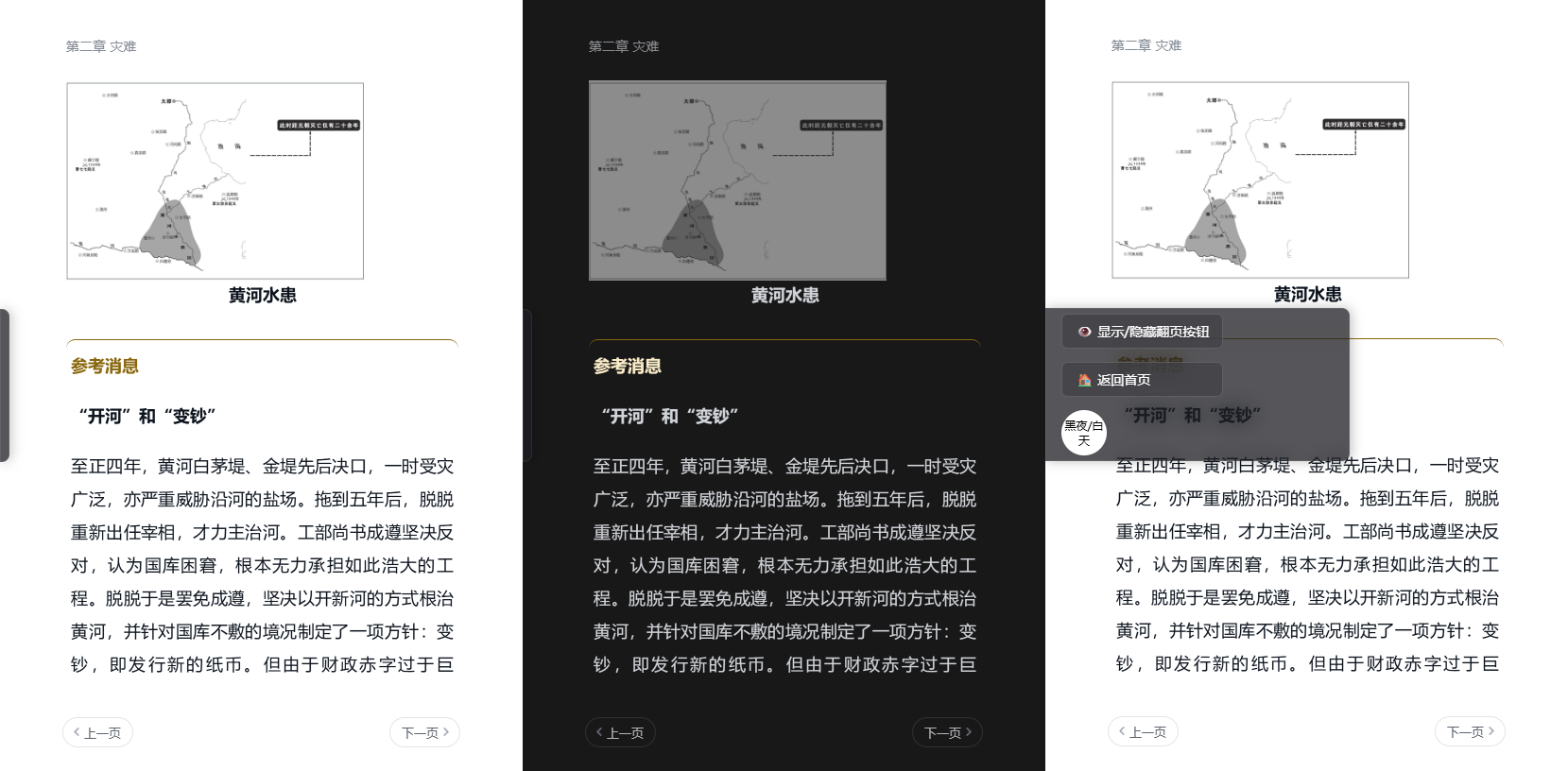
<p>其实就是通过注入js和css,增加了一些功能和一个面板,调整了微信阅读阅读界面背景的透明度</p>
<p>再通过tauri 设置无边窗口和窗口透明,以及全局的快捷键实现翻页和老板键,最后是窗口状态的保存和恢复.Pake自身就有窗口状态恢复和老板键功能.</p>
<p>最后效果大家可以看图: 图片背景均是透明此处展示两种颜色模式下字体的变换</p>
<p><img src="https://luchetuchuang.oss-cn-beijing.aliyuncs.com/img/all.png" alt="all" /></p>
<p>这次很开心,可以说是站在巨人的肩膀上写出来这个软件.</p>
]]></content>
        <author>
            <name>Aprdec</name>
            <uri>https://wwww.aprdec.top/</uri>
        </author>
        <published>2025-09-28T00:00:00.000Z</published>
    </entry>
    <entry>
        <title type="html"><![CDATA[一些图片一些回忆一些感触]]></title>
        <id>https://wwww.aprdec.top/posts/%E4%B8%80%E4%BA%9B%E5%9B%BE%E7%89%87%E4%B8%80%E4%BA%9B%E5%9B%9E%E5%BF%86%E4%B8%80%E4%BA%9B%E6%84%9F%E8%A7%A6/</id>
        <link href="https://wwww.aprdec.top/posts/%E4%B8%80%E4%BA%9B%E5%9B%BE%E7%89%87%E4%B8%80%E4%BA%9B%E5%9B%9E%E5%BF%86%E4%B8%80%E4%BA%9B%E6%84%9F%E8%A7%A6/"/>
        <updated>2025-06-19T00:00:00.000Z</updated>
        <summary type="html"><![CDATA[上班已经半个多月了,我很庆幸公司同事都很好,公司氛围也很好. 今天晚上算是来到武汉二十天来第一次认真坐在自己的电脑面前浏览,但是百无聊赖,不...]]></summary>
        <content type="html"><![CDATA[<h1>一些图片,一些回忆,一些感触</h1>
<p>上班已经半个多月了,我很庆幸公司同事都很好,公司氛围也很好.</p>
<p>今天晚上算是来到武汉二十天来第一次认真坐在自己的电脑面前浏览,但是百无聊赖,不想玩游戏,不想写代码,看看QQ音乐里有200多首本地音乐,打开一看是之前下载跑跑卡丁车OST合集.随便点开一首,轻快的鼓点动感的节奏,还是那么好听.不免又伤感起来,想想小时候和老哥一起玩跑跑卡丁车,当时才几岁?十岁?从小蜜蜂SR刚出的时候开始玩,一直玩到HT时代,不记得几年了,但是跑跑卡丁车绝对是我心里最有感触的一款游戏,里面的人物,剧情,音乐都让我喜欢.后来跑2出来后也玩了一段时间,很可惜我玩的steam服,之后就停服了,充的没花的300块游戏币也没了.</p>
<p>想看看电脑上有没有关于跑跑卡丁车的截图,翻来翻去很可惜.总是在回忆起时才后悔曾经未曾记录,或者记录的不够多.再翻翻,发现了以前的一些其他游戏截图.</p>
<p><img src="https://luchetuchuang.oss-cn-beijing.aliyuncs.com/aprimg/ryujinx_capture_2022-11-30_09-59-13.png" alt="ryujinx_capture_2022-11-30_09-59-13" /></p>
<p><img src="https://luchetuchuang.oss-cn-beijing.aliyuncs.com/aprimg/QQ%E6%88%AA%E5%9B%BE20210928190637.png" alt="QQ截图20210928190637" /></p>
<p>说实话我对游戏不上瘾,难有让我沉下心玩的,巫师3算一个吧.从大三开始感觉自己每天都活在忙碌之中,也不知道自己在忙什么.之后准备考研,考完研后准备找工作,找到工作开始准备毕业论文,我总是告诉自己今天要做完什么,这样明天就轻松了,周而复始,每一天都不轻松.</p>
<p>可惜,仅有的两个游戏的截图,一个是宝可梦,一个是破晓传说,玩这两个游戏的时候我才大二/暑假,还记得打破晓传说大结局的时候给女朋友直播,让她看我打,结果这游戏结尾堆怪太多快给我打吐了,应该是叫魔霸斩吧主角的BUG技能,按的我手指疼,索性结局很好,看到男女主结婚让我很开心,女朋友那时候也和我一起开心.转眼是一个没穿上衣的男人坐在出租屋的椅子上,一边打字一遍黯然神伤.</p>
<p>哎,我的大学真的很快,其实很后悔,感觉自己没有好好体会了大学,大一大二那时候疫情,我每天就是学习一会代码,然后摸摸鱼,但那时候还很快乐,毕竟刚进入大学的人都对自己的未来或者至少眼下觉得很轻松吧.可惜疫情结束后我也未能认真享受大学生活,依旧每天忙忙碌碌,恋爱没谈,身体也未得到锻炼,甚至郑州我都没能转完,直到马上要离开了和朋友一起转悠的还是常去的那几个地方.朋友们都说我得到了知识,有了技术.这真的值吗?可能找工作前我还能和自己讲讲,我的水平还是不错的,经历了找工作后,我不得不反思.如果能重来?我真的想切身的热烈的感受大学生活,当然,最有可能的应该我还是和上次一样吧.</p>
<p>时间过得真快,我没有拍毕业照没有参加毕业典礼没能穿上学士服,因为要去工作了.真的值吗?其实真的很想穿一穿学士服,万一有点帅呢?我也想和几个人合影,哈哈,也想和两个女孩子合照,可惜等不到那时候我就要离校了.翻照片还翻到我和老哥2021年的聊天截屏,一瞬间就过去四年了,从上初中开始我就感觉时间过得很快,从今天的角度初中已经有些遥远了在我心里,但是高中却依旧感觉是昨天,入学的场面我依然历历在目.离校后两天我住在家里,有天我和妈妈聊天,我说我现在还觉得高中犹如昨天,妈妈和我说,她现在还觉得高考那天历历在目.我有些惊讶,没想到已经过去三十年了,妈妈却和我有相同感受,是不是我五十岁了也依旧觉得高中犹如昨天?</p>
<p>我担心父母老去,担心子欲养而亲不待,工作前我曾经想每个月给父母转钱,年底哥哥给妈妈发了一个六千块的大红包,那时候的我还和妈妈说,以后我每个月都给你两千,那时候,我还觉得自己很值钱呢.可现在一盘算每个月吃吃喝喝交交房租剩下的钱也没多少了,当然也足够给妈妈两千了,却和曾经的幻想相差甚远.寒假我和两个好友在家里玩,那时我们讨论起自己工作后买车的事情,一个朋友那时候签了BYD,所以他说他可能会买一辆BYD吧.我说我要买SU7,那时候我还在幻想自己工作两三年买一辆不成问题.哎,学历真的挺重要的.</p>
<p>离开时妈妈给了我很多钱,多到我买了很多东西都还剩特别多.妈妈说是哥哥那时候出去闯荡,她不懂,哥哥要了5000她也就只给了5000,哥哥那时候没工作,一个人跑到深圳拿着5000块钱,中间遇到疫情四年没有回家,好在四年后的他已经有了很好的工作,并且职位也不断向上.以前我不懂他刚去深圳有多难,妈妈也不懂,直到他回来后后他的朋友们聚在一起聊天,我们才突然发现当初他有多么难过.所以妈妈给了我很多钱,我的情况比哥哥好了不知道多少倍,我有确定的工作,刚来我就能租上大卧室,能买电动车,买人体工学椅.我很感谢她,也感谢爸爸,其实心里一直很感谢,但小时候却从来都不好意思开口,工作了才真正能感觉自己能大方的对父母发出"感谢你们"的话.</p>
<p>和哥哥和他的朋友们一起玩真的很开心.</p>
<p>&lt;video src="C:\Users\p\Downloads[SHANA]playback (2).mp4"&gt;&lt;/video&gt;</p>
<p>和朋友们在一起也真的很开心.<img src="https://luchetuchuang.oss-cn-beijing.aliyuncs.com/aprimg/mmexport1748406608392.jpg" alt="mmexport1748406608392" /></p>
<p><img src="https://luchetuchuang.oss-cn-beijing.aliyuncs.com/aprimg/mmexport1748351918893.jpg" alt="mmexport1748351918893" /></p>
<p><img src="https://luchetuchuang.oss-cn-beijing.aliyuncs.com/aprimg/P20250512-215834.jpg" alt="P20250512-215834" /></p>
<p>谢谢你们.</p>
]]></content>
        <author>
            <name>Aprdec</name>
            <uri>https://wwww.aprdec.top/</uri>
        </author>
        <published>2025-06-19T00:00:00.000Z</published>
    </entry>
    <entry>
        <title type="html"><![CDATA[记述一次帮同学运行毕设的经历]]></title>
        <id>https://wwww.aprdec.top/posts/%E8%AE%B0%E8%BF%B0%E4%B8%80%E6%AC%A1%E5%B8%AE%E5%90%8C%E5%AD%A6%E8%BF%90%E8%A1%8C%E6%AF%95%E8%AE%BE%E7%9A%84%E7%BB%8F%E5%8E%86/</id>
        <link href="https://wwww.aprdec.top/posts/%E8%AE%B0%E8%BF%B0%E4%B8%80%E6%AC%A1%E5%B8%AE%E5%90%8C%E5%AD%A6%E8%BF%90%E8%A1%8C%E6%AF%95%E8%AE%BE%E7%9A%84%E7%BB%8F%E5%8E%86/"/>
        <updated>2025-05-28T00:00:00.000Z</updated>
        <summary type="html"><![CDATA[时间在答辩前一周(2025.5.7左右),那时我正在家不在学校.一个同学找我帮忙跑毕设(毕设是她的学长给她的).最初使用UU远程操控跑项目...]]></summary>
        <content type="html"><![CDATA[<h1>记述一次帮同学运行毕设的经历</h1>
<h2>背景介绍</h2>
<p>时间在答辩前一周(2025.5.7左右),那时我正在家不在学校.一个同学找我帮忙跑毕设(毕设是她的学长给她的).最初使用UU远程操控跑项目,之后为线下物理控制电脑.</p>
<p>花费了不短的时间,都很多原因,远程+我有时候头蒙+很多在网上搜索解决方法+同学电脑环境问题.</p>
<h2>后端启动</h2>
<p>第一天是使用的远程,抛开远程的延迟和卡顿,整个过程也很折磨.首先帮她跑后端项目,后端使用了Redis+Mysql,查看了下同学电脑上安装了Mysql5.6,但是她忘记了密码.于是开始帮她重置密码,在网上搜索修改方法后开始根据步骤一步一步走,使用的方法就是跳过权限表直接修改数据库的密码,但是不知道为什么,尝试了两次,提示修改成功后,重启登录数据库密码依旧错误(一小时过去了).索性直接卸载数据库重装,帮她安装了Mysql8,期间发生了什么忘了,但还是成功安装上了,后端便不在有什么阻挠了.</p>
<h2>前端初尝试启动</h2>
<p>后端启动完毕后,我开始看她的前端,看到node_sass和sass_loader的那一刻,我便知道她得请两顿了.最初她的学长直接把整个项目打包发给她,没有排除node_modules,我一开始也没注意,直接npm install先试试,安装过程就很慢了,每次都卡在一个地方(具体想不起来了),于是我想试试pnpm(提前告知:pnpm并不可以使用在一些老项目里,不兼容),很明显也不行,后来我注意到了她的学长把node_modules发过来了,于是开始删除node_modules,几万个小文件删除的速度太慢了,又搞了一个小时,不搞了,吃中饭.</p>
<h2>晚上第二次尝试前端</h2>
<p>晚上继续远程帮同学npm install,她的学长给她发过来一份不包含node_modules的前端文件,那好办了,我看了看项目的sass版本和她的node版本正好匹配,install吧,安装一次得十多分钟,还一直有报错,期间碰到了需要编译sass的问题,这能说啥,安装nodegyp呗,不成想这才是故事的开端.那天晚上具体解决了什么忘了,反正走一步解决一部呗,看报错,搜网络,解决,继续报错.....晚上没弄完,第三天回学校接着搞.</p>
<h2>线下接着搞</h2>
<p>我们在图书馆帮她接着安装环境(空调+电源只有这里有).</p>
<p>一般node里嵌有gyp? 这里写了点但是实在是记不清细节了,索性把碰到的问题写在下面吧.</p>
<p>1.gyp版本一直是7.x,即使更新了全局版本和官方提供的更新内嵌版本,查询版本是v11.x,结果npm install依旧是7.x</p>
<p>2.gyp版本引起的Python版本,从头安装Python,安装Python3针对Python2的兼容库,最后直接安装Python2</p>
<p>3.此时发现我们迪哥的电脑用户名是中文,搜索修改windows用户名的方法,尝试未果(本地管理员修改名称一直有进程占用),索性你就用本地管理员跑项目吧.</p>
<p>4.visual studio安装.起初安装的2022,然后改为2017.</p>
<p>5.当这一切都解决后,我感觉到成功已经就在眼前,此时报错证书不通过?之前安装了nodesass主页上的环境配置库,删除所有镜像后依旧报错,傻眼了,有点崩溃,明明要成功了..仔细查看log后,发现是一个下载二进制的链接依旧是镜像,搜索,修改镜像,成功.</p>
<h2>总结</h2>
<p>学到了很多吧.写起来不多,但是花费了很长时间,不仅是远程延迟,网络问题,还有npm install一次得二十分钟了(还要编译),每次修改错误就得install一次,实在是折磨.</p>
<p>嗯,烤肉不错.<img src="https://luchetuchuang.oss-cn-beijing.aliyuncs.com/aprimg/P20250508-182758.jpg" alt="P20250508-182758" /></p>
]]></content>
        <author>
            <name>Aprdec</name>
            <uri>https://wwww.aprdec.top/</uri>
        </author>
        <published>2025-05-28T00:00:00.000Z</published>
    </entry>
    <entry>
        <title type="html"><![CDATA[讲讲和我河南农业大学的一些破事]]></title>
        <id>https://wwww.aprdec.top/posts/%E8%AE%B2%E8%AE%B2%E5%92%8C%E6%88%91%E6%B2%B3%E5%8D%97%E5%86%9C%E4%B8%9A%E5%A4%A7%E5%AD%A6%E7%9A%84%E4%B8%80%E4%BA%9B%E7%A0%B4%E4%BA%8B/</id>
        <link href="https://wwww.aprdec.top/posts/%E8%AE%B2%E8%AE%B2%E5%92%8C%E6%88%91%E6%B2%B3%E5%8D%97%E5%86%9C%E4%B8%9A%E5%A4%A7%E5%AD%A6%E7%9A%84%E4%B8%80%E4%BA%9B%E7%A0%B4%E4%BA%8B/"/>
        <updated>2025-03-24T00:00:00.000Z</updated>
        <summary type="html"><![CDATA[开局先送河南农业大学信息办公室,IT工作室一个中指.鄙视你们所有人. 两件事分别和上面两个学校组织/部门有关,倒序讲讲. 我一直对学校是一种...]]></summary>
        <content type="html"><![CDATA[<h1>讲讲和我河南农业大学的一些破事</h1>
<p>开局先送河南农业大学信息办公室,IT工作室一个中指.鄙视你们所有人.</p>
<p>两件事分别和上面两个学校组织/部门有关,倒序讲讲.</p>
<p>我一直对学校是一种敬仰,最起码是尊重的,但是学校真的让我失望.写这篇文章纯粹吐槽.</p>
<h2>App被抄袭</h2>
<p>这个子标题可能言重(引流),我不知道这算不算抄袭.</p>
<p>今年寒假前我突发奇想想写一个查看学校充电桩的APP,因为学校电车多充电桩少,这个APP可以极大的提高效率.</p>
<p>技术栈使用Flutter,回家前第一版就已经写好了,寒假在家完善了完善,开学发布在了学校贴吧上,为什么发在贴吧上呢?因为这里没有学校官方人员,经过之前的一些事(之后讲到)我对学校的办事恶心程度已经有了一定认识,害怕他们找事.</p>
<p><strong>我不是什么圣人,做不到做好事不图回报</strong>,我的App里有仓库地址,第一次启动会弹窗(仅此一次)提示有能力的同学为我点一个star.</p>
<p>我向辅导员提交了这个APP,希望导员可以询问一下学校的态度,是否能帮助我推广一下.结果学校的态度没等到,等到了IT工作室复刻了一个相同功能的微信小程序.</p>
<p>哈哈~,我简直是🤡。</p>
<p>当然应用本身没什么难度，功能单一，可惜,star只获得了14个(包括我让身边人点的).</p>
<p><strong>我以为这种行为最起码会询问一下我呢,一声不吭的态度让我恶心.</strong></p>
<h2>校园网被随意停封,电脑被随意搜查</h2>
<p>这件事发生在考研前,24年10月吧.</p>
<p>当天下午2点收到某公司的人打电话询问我是否对学校某服务发动了攻击,我说没有(事发当时我在隔壁寝室根本不在自己寝室,我也不会做这种事,室友也不可能),随后派人来我们寝室搜查,因为我们寝室路由器使用我的校园网(校园网限制设备,在路由器登陆全寝室都可以用).该人协助公司的人远程操控我的电脑查看了30多分钟,查看了我的pycharm,浏览器记录,还有系统日志等等,当时我有点懵同意他们查看我的电脑,但是事后想想他们的一些操作纯粹是为了满足自己的恶趣味,比如查看我的浏览器记录查看到8月份的记录还要向下翻,我停止了他们继续查看(众所周知的原因).</p>
<p>随后对我们寝室其他人的电脑分别查看了5分钟左右,没有查出原因后离开.</p>
<p>第二天起来发现我的校园网账号被停用,我打电话询问告知我暂时停封要搜寻证据报警,让我去信息化办公室报备,之后会自动恢复.</p>
<p>当天下午辅导员找我,询问我是否攻击了学校服务器,我说没有,(我对导员没意见,但导员秉持是我做了这件的态度让我不舒服),讲了半天,又问我你为什么要做?我????,反正我没有.</p>
<p>之后因为要备考在学校也没事干回家去了,考研前一周回到学校,回到学校室友告诉我校园网被停了一个月多,寝室路由器连不上网(我的校园网依旧被封禁,使用的室友的账号),我在简单尝试重连无果后没有再继续,因为一周后就要考试了,我也猜到了是信息化办公室做的.</p>
<p>考完当天我致电导员,跟她描述了情况希望她可以联系一下信息化办公室,但是等待一天无果,于是我在学校公众号上找到了电话打电话询问.</p>
<p>起初信息化办公室说自己绝对不会随意封禁学生校园网账号,但是他们两个校区的人员合计后承认了并且给我解了封,我说我们的路由器依旧连不上网,询问是否将我们的路由器拉黑,他们否认并让我重置,最后我切换了网口更改了MAC地址才重连上.</p>
<h2>结尾</h2>
<p>说真的,可能学校也没做什么,大家都是按程序办事,但是作为参与其中的人我感觉我很不舒服.</p>
]]></content>
        <author>
            <name>Aprdec</name>
            <uri>https://wwww.aprdec.top/</uri>
        </author>
        <published>2025-03-24T00:00:00.000Z</published>
    </entry>
    <entry>
        <title type="html"><![CDATA[flutter使用GitHub Action自动打包APK并上传Release]]></title>
        <id>https://wwww.aprdec.top/posts/flutter%E4%BD%BF%E7%94%A8github-action%E8%87%AA%E5%8A%A8%E6%89%93%E5%8C%85apk%E5%B9%B6%E4%B8%8A%E4%BC%A0release/</id>
        <link href="https://wwww.aprdec.top/posts/flutter%E4%BD%BF%E7%94%A8github-action%E8%87%AA%E5%8A%A8%E6%89%93%E5%8C%85apk%E5%B9%B6%E4%B8%8A%E4%BC%A0release/"/>
        <updated>2025-02-17T00:00:00.000Z</updated>
        <summary type="html"><![CDATA[最近写了一个查看河农大充电桩使用情况的APP,用的flutter,写了一个Github action记录并分享一下. 如何手动打包APK请先...]]></summary>
        <content type="html"><![CDATA[<h1>flutter使用github action自动打包APK/IPA(未签名)并上传release</h1>
<p>最近写了一个查看河农大充电桩使用情况的APP,用的flutter,写了一个Github action记录并分享一下.</p>
<p>如何手动打包APK请先跟随网上教程跟一遍,将该写的配置写完.</p>
<h2>正式发布</h2>
<pre><code>name: build
on:
  push:
    tags:
      - 'v*'
jobs:
  release:
    name: Create release
    runs-on: ubuntu-latest
    permissions:
      contents: write
    steps:
      - name: Checkout
        uses: actions/checkout@v4
      - name: Extract release notes
        id: extract-release-notes
        uses: ffurrer2/extract-release-notes@v2
        env:
          GITHUB_TOKEN: ${{ secrets.RELASE_TOKEN }}
      - name: Create release
        uses: ncipollo/release-action@v1
        with:
          allowUpdates: true
          body: '${{ steps.extract-release-notes.outputs.release_notes }}'
  build_android:
    name: build_android
    runs-on: ubuntu-latest
    needs: [ release ]
    permissions:
      contents: write
    steps:
      - name: Clone repository
        uses: actions/checkout@v4
      - uses: actions/setup-java@v4
        with:
          distribution: 'zulu'
          java-version: '17'
      - name: Set up Flutter
        uses: subosito/flutter-action@v2
        with:
          channel: stable
          flutter-version-file: pubspec.yaml # path to pubspec.yaml
          cache: true
      - run: flutter --version
      - name: Setup keystore
        run: |
          echo '${{ secrets.KEYSTORE }}' | base64 --decode &gt; android/app/Aprdec.keystore
          echo '${{ secrets.KEY_PROPERTIES }}' &gt; android/key.properties
      - name: build
        run: |
          flutter pub get
          flutter build apk --target-platform android-arm,android-arm64,android-x64 --split-per-abi
      - name: Pack Android apk
        run: |
          pushd build/app/outputs/flutter-apk/
          mv app-arm64-v8a-release.apk HNDcharge-arm64_v8a.apk
          mv app-armeabi-v7a-release.apk HNDcharge_armeabi_v7a.apk
          popd
      - name: Release Android artifacts
        uses: ncipollo/release-action@v1
        with:
          allowUpdates: true
          omitBody: true
          omitBodyDuringUpdate: true
          artifacts: 'build/app/outputs/flutter-apk/HNDcharge-arm64_v8a.apk,build/app/outputs/flutter-apk/HNDcharge_armeabi_v7a.apk'
  build-macos-and-ios:
    name: Build iOS
    needs: [ release ]
    runs-on: macos-latest
    permissions:
      contents: write
    steps:
      - uses: actions/checkout@v4
      - uses: subosito/flutter-action@v2
        with:
          flutter-version: ${{env.CI_FLUTTER_VERSION}}
          cache: true
      - name: Precompile
        run: |
          git submodule update --init --recursive --force
          flutter pub get
      - name: Build iOS ipa
        run: |
          flutter build ios --release --no-codesign
      - name: Packing
        run: |
          mkdir Payload
          mv build/ios/iphoneos/Runner.app Payload
          zip -r9 HNDcharge.ipa Payload
      - name: Release iOS artifacts
        uses: ncipollo/release-action@v1
        with:
          allowUpdates: true
          omitBody: true
          omitBodyDuringUpdate: true
          omitPrereleaseDuringUpdate: true
          artifacts: 'HNDcharge.ipa'
</code></pre>
<h3>Step:Setup keystore</h3>
<p>使用base64 Aprdec.keystore编码并且保存到仓库变量中,在构建时生成文件.如果你是.jks文件修改文件后缀即可</p>
<h2>测试action</h2>
<p>少了创建发布release,多了将产物上传artifacts</p>
<pre><code>name: build_test
on:
  workflow_dispatch:
    inputs:
      build_android:
        description: Build Android platform artifacts.
        required: true
        type: boolean
        default: true
      build_ios:
        description: Build iOS platform artifacts.
        required: true
        type: boolean
        default: true
      dry_run:
        description: Dry run, do NOT upload artifacts.
        required: true
        type: boolean
        default: true
jobs:
  build_android:
    name: build_android
    if: ${{ github.event_name == 'push' || inputs.build_android }}
    runs-on: ubuntu-latest
    steps:
      - name: Clone repository
        uses: actions/checkout@v4
      - uses: actions/setup-java@v4
        with:
          distribution: 'zulu'
          java-version: '17'
      - name: Set up Flutter
        uses: subosito/flutter-action@v2
        with:
          channel: stable
          flutter-version-file: pubspec.yaml # path to pubspec.yaml
          cache: true
      - run: flutter --version
      - name: Setup keystore
        run: |
          echo '${{ secrets.KEYSTORE }}' | base64 --decode &gt; android/app/Aprdec.keystore
          echo '${{ secrets.KEY_PROPERTIES }}' &gt; android/key.properties
      - name: build
        run: |
          flutter pub get
          flutter build apk --target-platform android-arm,android-arm64,android-x64 --split-per-abi
      - name: Pack Android apk
        run: |
          pushd build/app/outputs/flutter-apk/
          mv app-arm64-v8a-release.apk HNDcharge-arm64_v8a.apk
          mv app-armeabi-v7a-release.apk HNDcharge_armeabi_v7a.apk
          popd
      - name: Upload Android artifacts
        if: ${{ github.event_name != 'push' &amp;&amp; inputs.build_android &amp;&amp; !inputs.dry_run }}
        uses: actions/upload-artifact@v4
        with:
          name: HNDcharge-arm64_v8a
          path: |
            build/app/outputs/flutter-apk/HNDcharge-arm64_v8a.apk

  build-macos-and-ios:
    name: Build MacOS and iOS
    if: ${{ github.event_name == 'push'|| inputs.build_ios }}
    runs-on: macos-latest
    steps:
      - uses: actions/checkout@v4
        with:
          fetch-depth: 0
      - uses: subosito/flutter-action@v2
        with:
          flutter-version: ${{env.CI_FLUTTER_VERSION}}
          cache: true
      - name: Precompile
        run: |
          git submodule update --init --recursive --force
          flutter pub get
      - name: Build iOS ipa
        if: ${{ github.event_name == 'push' || inputs.build_ios }}
        run: |
          flutter build ios --release --no-codesign
      - name: Packing
        if: ${{ github.event_name == 'push' || inputs.build_ios }}
        run: |
          mkdir Payload
          mv build/ios/iphoneos/Runner.app Payload
          zip -r9 HNDcharge.ipa Payload
      - name: Upload iOS artifacts
        if: ${{ github.event_name != 'push' &amp;&amp; inputs.build_ios &amp;&amp; !inputs.dry_run }}
        uses: actions/upload-artifact@v4
        with:
          name: HNDcharge-ios-tarball
          path: HNDcharge.ipa
</code></pre>
<h2>参考</h2>
<p><a href="https://kzs.moe/blog/015-flutter-github-workflow">github action搭建flutter流水线 | Distant Vicinity</a></p>
<p><a href="https://blog.csdn.net/qq_41614928/article/details/105183419">Flutter项目打包成安卓apk详解来了（解决安装没网络问题）_flutter 生成apk-CSDN博客</a></p>
]]></content>
        <author>
            <name>Aprdec</name>
            <uri>https://wwww.aprdec.top/</uri>
        </author>
        <published>2025-02-17T00:00:00.000Z</published>
    </entry>
    <entry>
        <title type="html"><![CDATA[写着玩]]></title>
        <id>https://wwww.aprdec.top/posts/%E5%86%99%E7%9D%80%E7%8E%A9/</id>
        <link href="https://wwww.aprdec.top/posts/%E5%86%99%E7%9D%80%E7%8E%A9/"/>
        <updated>2025-02-10T00:00:00.000Z</updated>
        <summary type="html"><![CDATA[flutter Github仓库:https://github.com/AprDeci/HNDchargestation 蓝奏云: http...]]></summary>
        <content type="html"><![CDATA[<h1>写着玩</h1>
<h2>河农大充电桩查看APP</h2>
<p>flutter
Github仓库:https://github.com/AprDeci/HNDchargestation
蓝奏云: https://wwqw.lanzouu.com/b007t784sf 密码:aapr</p>
<p><img src="https://luchetuchuang.oss-cn-beijing.aliyuncs.com/aprimg/image1.png" alt="img" /></p>
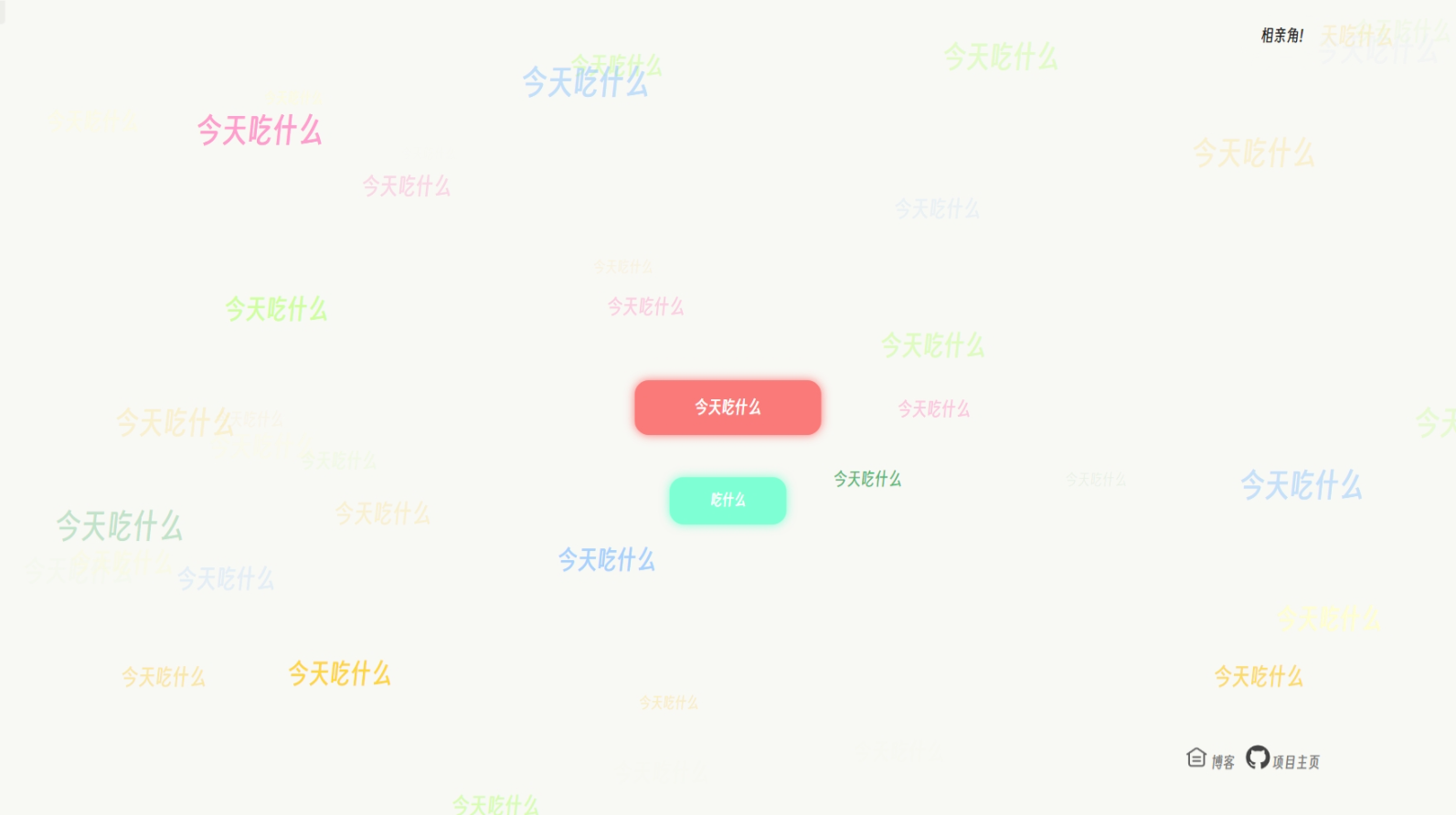
<h2>农带今天吃什么</h2>
<p>前端三剑客</p>
<p>[点击进入](<a href="https://github.com/aprdeci/NDeatwhat">q1263868407/NDeatwhat (github.com)</a>)</p>
<p><img src="https://luchetuchuang.oss-cn-beijing.aliyuncs.com/aprimg/image-20230922192520033.png" alt="image-20230922192520033" /></p>
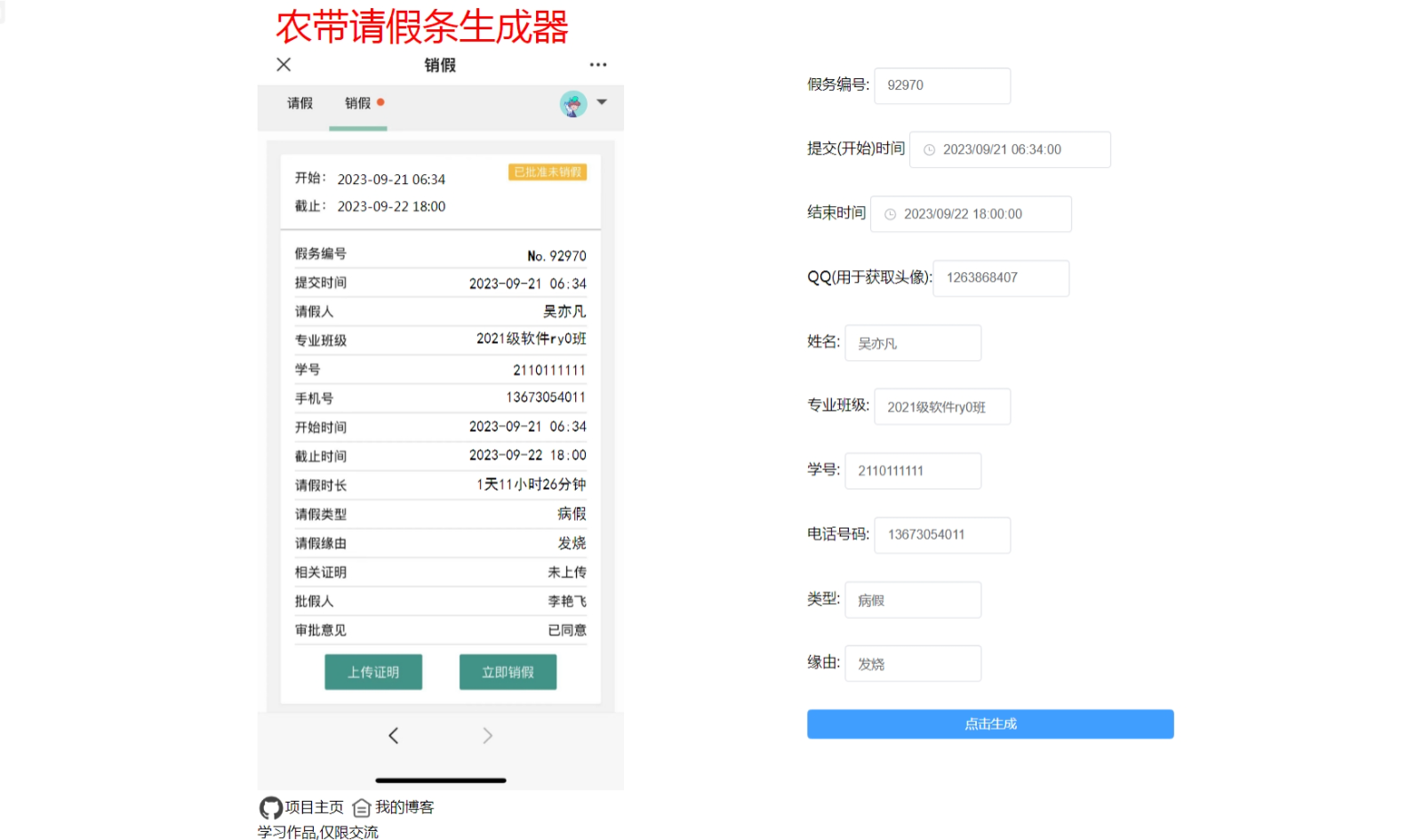
<h2>农带请假条生成</h2>
<p>Vue学习作品</p>
<p>[点击进入](<a href="https://aprdeci.github.io/NDjtcreator/">荷兰农带请假条生成器 (q1263868407.github.io)</a>)</p>
<p><img src="https://luchetuchuang.oss-cn-beijing.aliyuncs.com/aprimg/image-20230922192558582.png" alt="image-20230922192558582" /></p>
]]></content>
        <author>
            <name>Aprdec</name>
            <uri>https://wwww.aprdec.top/</uri>
        </author>
        <published>2025-02-10T00:00:00.000Z</published>
    </entry>
    <entry>
        <title type="html"><![CDATA[crawl4ai 真的很好用]]></title>
        <id>https://wwww.aprdec.top/posts/crawl4ai-%E7%9C%9F%E7%9A%84%E5%BE%88%E5%A5%BD%E7%94%A8/</id>
        <link href="https://wwww.aprdec.top/posts/crawl4ai-%E7%9C%9F%E7%9A%84%E5%BE%88%E5%A5%BD%E7%94%A8/"/>
        <updated>2025-01-17T00:00:00.000Z</updated>
        <summary type="html"><![CDATA[考完研后和开了个MC服务器和朋友们玩,之前没研究过,没想到MC服务器能折腾的也太多了,仅仅是各种插件的配置就能让我累死.于是放假回家后准备用...]]></summary>
        <content type="html"><![CDATA[<h1>crawl4ai 真的很好用</h1>
<p>考完研后和开了个MC服务器和朋友们玩,之前没研究过,没想到MC服务器能折腾的也太多了,仅仅是各种插件的配置就能让我累死.于是放假回家后准备用LLM框架来将插件的wiki导入知识库,用AI帮我写.</p>
<p>最初使用的是maxkb,但是maxkb一是社区版有限制,还老是提示,很烦.二是不知为什么(可能是我设置的不对),不论怎么修改,AI回复的token长度都很短,并且基本没有记忆(我是修改了的).</p>
<p>昨天尝试安装了dify,但是dify的网页爬虫仅支持Jina Reader和 Firecrawl,两个都是收费的(有免费token,也可以自部署),在研究过程中,了解到了crawl4ai这个开源项目.这个项目可以快速爬取并生成适合LLM知识库的MD文档,并且可以借助LLM大模型帮助爬虫分析网页结构数据.并且我自己使用下来真的是一个很快速,很方便的爬虫框架.写这篇博客不仅是保存一下我用的代码,更是向大家推荐一下</p>
<p>先贴一下github上的官方介绍</p>
<hr />
<ol>
<li>
<p><strong>Built for LLMs</strong>: Creates smart, concise Markdown optimized for RAG and fine-tuning applications.</p>
</li>
<li>
<p><strong>Lightning Fast</strong>: Delivers results 6x faster with real-time, cost-efficient performance.</p>
</li>
<li>
<p><strong>Flexible Browser Control</strong>: Offers session management, proxies, and custom hooks for seamless data access.</p>
</li>
<li>
<p><strong>Heuristic Intelligence</strong>: Uses advanced algorithms for efficient extraction, reducing reliance on costly models.</p>
</li>
<li>
<p><strong>Open Source &amp; Deployable</strong>: Fully open-source with no API keys—ready for Docker and cloud integration.</p>
</li>
<li>
<p><strong>Thriving Community</strong>: Actively maintained by a vibrant community and the #1 trending GitHub repository.</p>
</li>
</ol>
<hr />
<p>Github:<a href="https://github.com/unclecode/crawl4ai">unclecode/crawl4ai: 🚀🤖 Crawl4AI: Open-source LLM Friendly Web Crawler &amp; Scraper</a></p>
<p>官方文档:<a href="https://docs.crawl4ai.com/">Home - Crawl4AI Documentation</a></p>
<h2>单页面爬取</h2>
<p>我对crawl4ai的使用主要根据官方文档的代码进行修改(他们的文档真的很棒),单页面爬取我仅贴一下官方的代码不再多说</p>
<pre><code>import asyncio
from crawl4ai import AsyncWebCrawler

async def main():
    # Create an instance of AsyncWebCrawler
    async with AsyncWebCrawler() as crawler:
        # Run the crawler on a URL
        result = await crawler.arun(url="https://crawl4ai.com")

        # Print the extracted content
        print(result.markdown)

# Run the async main function
asyncio.run(main())
</code></pre>
<h2>多页面爬取</h2>
<h3>会话重用爬取多页面</h3>
<p>我最头疼的就是插件的wiki多页面爬取了,crawl4ai很好的解决了问题.</p>
<p>获取urllist我依靠wiki的sitemap,绝大多数的wiki/网站都会有sitemap.</p>
<p>官方文档提供了高性能多页面爬取代码,不再为每个页面都开启一个浏览器,而是一个浏览器开启多个页面,这样不仅节省了资源也加快了速度.下面是我的代码,仅仅是复制了一下官方文档,添加了解析sitemap获取urllist的方法.</p>
<pre><code>import asyncio
from typing import List
from urllib.parse import urlparse
from xml.etree import ElementTree

import requests
from crawl4ai import AsyncWebCrawler, BrowserConfig, CrawlerRunConfig
from crawl4ai.markdown_generation_strategy import DefaultMarkdownGenerator

async def crawl_sequential(urls: List[str]):
    print("\n=== Sequential Crawling with Session Reuse ===")

    browser_config = BrowserConfig(
        headless=True,
        # For better performance in Docker or low-memory environments:
        extra_args=["--disable-gpu", "--disable-dev-shm-usage", "--no-sandbox"],
    )

    crawl_config = CrawlerRunConfig(
        markdown_generator=DefaultMarkdownGenerator()
    )

    # Create the crawler (opens the browser)
    crawler = AsyncWebCrawler(config=browser_config)
    await crawler.start()

    try:
        session_id = "session1"  # Reuse the same session across all URLs
        for index,url in enumerate (urls):
            result = await crawler.arun(
                url=url,
                config=crawl_config,
                session_id=session_id
            )
            if result.success:
                print(f"Successfully crawled: {url}")
                print(f"Markdown length: {len(result.markdown_v2.raw_markdown)}")
                with open(f"./result/{urlparse(url).path.replace('/','_')}.md", "w",encoding='utf-8') as f:
                    f.write(result.markdown_v2.raw_markdown)
            else:
                print(f"Failed: {url} - Error: {result.error_message}")
    finally:
        # After all URLs are done, close the crawler (and the browser)
        await crawler.close()


def get_pydantic_ai_docs_urls():
    """
    Fetches all URLs from the Pydantic AI documentation.
    Uses the sitemap (https://ai.pydantic.dev/sitemap.xml) to get these URLs.

    Returns:
        List[str]: List of URLs
    """
    sitemap_url = "https://example.com/sitemap.xml"
    try:
        response = requests.get(sitemap_url)
        response.raise_for_status()
        # Parse the XML
        root = ElementTree.fromstring(response.content)

        # Extract all URLs from the sitemap
        # The namespace is usually defined in the root element
        namespace = {'ns': 'http://www.sitemaps.org/schemas/sitemap/0.9'}
        urls = [loc.text for loc in root.findall('.//ns:loc', namespace)]
        return urls
    except Exception as e:
        print(f"Error fetching sitemap: {e}")
        return []


async def main():
    urls = get_pydantic_ai_docs_urls()
    await crawl_sequential(urls)

if __name__ == "__main__":
     asyncio.run(main())
</code></pre>
<h3>并行爬取</h3>
<p>crawl4ai也可以同时爬取多个页面,这样在提取很多个页面时可以大大提高速度,代码依旧是官方文档代码+解析sitemap方法.爬取完后会输出爬取失败的链接列表,会自动保存爬取成功的页面保存到指定目录md中(名字方法是我自己写的,可以随意修改)</p>
<pre><code>import os
import sys
from urllib.parse import urlparse
from xml.etree import ElementTree

import psutil
import asyncio

__location__ = os.path.dirname(os.path.abspath(__file__))
__output__ = os.path.join(__location__, "output")

import requests

# Append parent directory to system path
parent_dir = os.path.dirname(os.path.dirname(os.path.abspath(__file__)))
sys.path.append(parent_dir)

from typing import List
from crawl4ai import AsyncWebCrawler, BrowserConfig, CrawlerRunConfig, CacheMode

dirname: str = "dirname"
sitemapurl: str ="https://example.com/sitemap.xml"
crawl_config = CrawlerRunConfig(
    cache_mode=CacheMode.BYPASS,
    css_selector="div.content"
)
async def crawl_parallel(urls: List[str], max_concurrent: int = 3):
    print("\n=== Parallel Crawling with Browser Reuse + Memory Check ===")

    # We'll keep track of peak memory usage across all tasks
    peak_memory = 0
    process = psutil.Process(os.getpid())

    def log_memory(prefix: str = ""):
        nonlocal peak_memory
        current_mem = process.memory_info().rss  # in bytes
        if current_mem &gt; peak_memory:
            peak_memory = current_mem
        print(f"{prefix} Current Memory: {current_mem // (1024 * 1024)} MB, Peak: {peak_memory // (1024 * 1024)} MB")

    # Minimal browser config
    browser_config = BrowserConfig(
        headless=True,
        verbose=False,   # corrected from 'verbos=False'
        extra_args=["--disable-gpu", "--disable-dev-shm-usage", "--no-sandbox"],
    )


    # Create the crawler instance
    crawler = AsyncWebCrawler(config=browser_config)
    await crawler.start()

    try:
        # We'll chunk the URLs in batches of 'max_concurrent'
        success_count = 0
        fail_count = 0
        fail_urls = []
        for i in range(0, len(urls), max_concurrent):
            batch = urls[i : i + max_concurrent]
            tasks = []

            for j, url in enumerate(batch):
                # Unique session_id per concurrent sub-task
                session_id = f"parallel_session_{i + j}"
                task = crawler.arun(url=url, config=crawl_config, session_id=session_id)
                tasks.append(task)

            # Check memory usage prior to launching tasks
            log_memory(prefix=f"Before batch {i//max_concurrent + 1}: ")

            # Gather results
            results = await asyncio.gather(*tasks, return_exceptions=True)

            # Check memory usage after tasks complete
            log_memory(prefix=f"After batch {i//max_concurrent + 1}: ")

            # Evaluate results
            for url, result in zip(batch, results):
                if isinstance(result, Exception):
                    print(f"Error crawling {url}: {result}")
                    fail_count += 1
                elif result.success:
                    with open(f"./{dirname}/{urlparse(url).path.replace('/', '_')}.md", "w", encoding='utf-8') as f:
                        f.write(result.markdown_v2.raw_markdown)
                    success_count += 1
                else:
                    fail_urls.append(url)
                    fail_count += 1

        print(f"\nSummary:")
        print(f"  - Successfully crawled: {success_count}")
        print(f"  - Failed: {fail_count}")
        print(f"  - Failed URLs: {fail_urls}")

    finally:
        print("\nClosing crawler...")
        await crawler.close()
        # Final memory log
        log_memory(prefix="Final: ")
        print(f"\nPeak memory usage (MB): {peak_memory // (1024 * 1024)}")

def get_pydantic_ai_docs_urls():
    """
    Fetches all URLs from the Pydantic AI documentation.
    Uses the sitemap (https://ai.pydantic.dev/sitemap.xml) to get these URLs.

    Returns:
        List[str]: List of URLs
    """
    #sitemap_url = "https://itemsadder.devs.beer/chinese/sitemap.xml"
    sitemap_url = sitemapurl
    try:
        response = requests.get(sitemap_url)
        response.raise_for_status()
        # Parse the XML
        root = ElementTree.fromstring(response.content)

        # Extract all URLs from the sitemap
        # The namespace is usually defined in the root element
        namespace = {'ns': 'http://www.sitemaps.org/schemas/sitemap/0.9'}
        urls = [loc.text for loc in root.findall('.//ns:loc', namespace)]
        return urls
    except Exception as e:
        print(f"Error fetching sitemap: {e}")
        return []
async def main():
    urls = get_pydantic_ai_docs_urls()
    await crawl_parallel(urls, max_concurrent=10)

if __name__ == "__main__":
    asyncio.run(main())
</code></pre>
<h2>一些小tips</h2>
<h3>crawl_config</h3>
<p>我的使用其实都只是皮毛,crawl4ai有更多强劲的方法,譬如在上面的代码中我设置了<strong>crawl_config</strong>,使用css选择器指定了爬虫页面,这样就可以去除wiki中每个页面都有的header和列表部分.crawl_config还有很多排除配置,可以帮你快速去除指定dom元素内容.还有缓存调节等等,更多的请自己看文档吧.</p>
<p>设置前:<img src="https://luchetuchuang.oss-cn-beijing.aliyuncs.com/aprimg/image-20250117110146297.png" alt="image-20250117110146297" /></p>
<p>设置后:</p>
<p><img src="https://luchetuchuang.oss-cn-beijing.aliyuncs.com/aprimg/image-20250117110302137.png" alt="image-20250117110302137" /></p>
<h3>Extracting JSON</h3>
<p>crawl4ai支持使用json定义爬取数据结构,指定dom元素为特定的元素,这样不仅不需要使用LLM,还有更强的稳定性.在爬取结构性很强的网页时候效果十分好</p>
<h3>更多</h3>
<p>可以看到其实我的使用场景目前都还没用到LLM协助,因为我只需要爬取下wiki的内容就好了,所以更多更强的内容还是需要你们查看文档自己学习一下.</p>
<p>使用过程中我只能说真的很强,速度和性能都很棒,十分契合我的需求,并且我认为<strong>不仅仅是爬取数据库,在绝大部分场景都可以使用crwal4ai.</strong></p>
]]></content>
        <author>
            <name>Aprdec</name>
            <uri>https://wwww.aprdec.top/</uri>
        </author>
        <published>2025-01-17T00:00:00.000Z</published>
    </entry>
    <entry>
        <title type="html"><![CDATA[无题]]></title>
        <id>https://wwww.aprdec.top/posts/%E6%97%A0%E9%A2%98/</id>
        <link href="https://wwww.aprdec.top/posts/%E6%97%A0%E9%A2%98/"/>
        <updated>2025-01-17T00:00:00.000Z</updated>
        <summary type="html"><![CDATA[刚刚朋友(本科211)保送中科大了,真是替他高兴,也钦佩他的才能. 还有一个朋友(本科211),年初我们一起约定冲击一个学校,但他暑假来了后...]]></summary>
        <content type="html"><![CDATA[<h1>无题</h1>
<p>刚刚朋友(本科211)保送中科大了,真是替他高兴,也钦佩他的才能.</p>
<p>还有一个朋友(本科211),年初我们一起约定冲击一个学校,但他暑假来了后重心逐渐转向了秋招,也十分顺利的收到了格力,比亚迪的offer.</p>
<p>看到他们都有了明确的方向,我一边替他们高兴,一边又感到自己的前途未卜.</p>
<p>还有两个多月就要考试了,这一年也不可谓不努力,但始终感觉希望渺茫.朋友的优秀让我愈发觉得自己弱小.</p>
<p>想找个人倾诉但身边没有交心好友,远方的朋友也都忙于自己的事情不好打扰.</p>
<p>到这个时候也不可能再言放弃,只能用一首诗不断地激励自己</p>
<blockquote>
<p>长风破浪会有时，直挂云帆济沧海</p>
</blockquote>
<h2>2024.10.1</h2>
<p>昨晚做梦梦到了_,梦里我们坐在一起聊天,似乎又像两年前一样.聊了一会她躺在了床上听我讲话,我正想跟她讲我们不联系后我还去她家找过她(这是另一个梦),话未出口突然醒了......有些怅然若失,已经很久没有梦到过了,已经不再想她了.</p>
<p>梦真是神奇,在这个梦里还能联动起从前的梦.</p>
]]></content>
        <author>
            <name>Aprdec</name>
            <uri>https://wwww.aprdec.top/</uri>
        </author>
        <published>2025-01-17T00:00:00.000Z</published>
    </entry>
    <entry>
        <title type="html"><![CDATA[Sakura主题修改WordPress加速]]></title>
        <id>https://wwww.aprdec.top/posts/sakura%E4%B8%BB%E9%A2%98%E4%BF%AE%E6%94%B9wordpress%E5%8A%A0%E9%80%9F/</id>
        <link href="https://wwww.aprdec.top/posts/sakura%E4%B8%BB%E9%A2%98%E4%BF%AE%E6%94%B9wordpress%E5%8A%A0%E9%80%9F/"/>
        <updated>2024-09-12T00:00:00.000Z</updated>
        <summary type="html"><![CDATA[sakura 主题的好是不言而喻的, 许多二次元的选择.我的博客也一直在使用并且持续的修改, 我也十分关注网站的速度, 网站从最初特别特别慢...]]></summary>
        <content type="html"><![CDATA[<h1>Sakura 主题修改(Wordpress 加速)</h1>
<p>sakura 主题的好是不言而喻的, 许多二次元的选择.我的博客也一直在使用并且持续的修改, 我也十分关注网站的速度, 网站从最初特别特别慢, 到现在逐渐变快, 是我一直在不断学习相关知识, 从最初的不懂到如今逐渐理解.但任重而道远, 我会在这篇博文记录我的一些优化博客速度的方法(防止我忘了)</p>
<p>我的博客的服务器是宽带 3M 的大陆服务器, 不知大伙访问我的博客速度如何?如果有朋友看到了这篇博客, 请留言告诉我你的体验, 谢谢!</p>
<h2>滑动顺滑</h2>
<p>使用了 <a href="https://github.com/darkroomengineering/lenis?utm_source=gold_browser_extension">lenis: How smooth scroll should be (github.com)</a> 库.</p>
<p>在 header 或 footer 某个文件引入以下代码即可, 更多参数可以看官方文档</p>
<pre><code>const lenis = new Lenis()

lenis.on('scroll', (e) =&gt; {
console.log(e)
})

function raf(time) {
lenis.raf(time)
requestAnimationFrame(raf)
}

requestAnimationFrame(raf)
</code></pre>
<h2>暗黑模式扩散动画</h2>
<p>修改文件 <img src="https://luchetuchuang.oss-cn-beijing.aliyuncs.com/aprimg/image-20240816171339812.png" alt="image-20240816171339812" /></p>
<p><strong>363 行 mobile_dark_light 修改如下</strong></p>
<pre><code>function mobile_dark_light(e) {
    var x = event.changedTouches ? event.changedTouches [0].clientX : (event.clientX || event.pageX);
    var y = event.changedTouches ? event.changedTouches [0].clientY : (event.clientY || event.pageY);
    console.log(x, y)
    const endRadius = Math.hypot(
        Math.max(x, innerWidth - x),
        Math.max(y, innerHeight - y),
      )
    document.documentElement.style.setProperty('--x', x + 'px')
    document.documentElement.style.setProperty('--y', y + 'px')
    document.documentElement.style.setProperty('--r', endRadius + 'px')
    if ($(" body ").hasClass(" dark ")) {
        if(document.startViewTransition) {
            document.startViewTransition(() =&gt; {
                $(" html ").removeClass(" dark ");
                $(" html ").css(" background ", " unset ");
                $(" body ").removeClass(" dark ");
                $("#moblieDarkLight ").html('&lt; i class =" fa fa-moon-o " aria-hidden =" true "&gt;&lt;/i &gt;');
                setCookie("dark", "0", 0.33);
            });
        }else {
            $(" html ").removeClass(" dark ");
            $(" html ").css(" background ", " unset ");
            $(" body ").removeClass(" dark ");
            $("#moblieDarkLight ").html('&lt; i class =" fa fa-moon-o " aria-hidden =" true "&gt;&lt;/i &gt;');
            setCookie("dark", "0", 0.33);
        }

    } else {
        if(document.startViewTransition){
            document.startViewTransition(() =&gt; {
                $(" html ").addClass(" dark ");
                $(" html ").css(" background ", "#31363b ");
                $("#moblieDarkLight ").html('&lt; i class =" fa fa-sun-o " aria-hidden =" true "&gt;&lt;/i &gt;');
                $(" body ").addClass(" dark ");
                setCookie("dark", "1", 0.33);
            })
            }else{
                $(" html ").addClass(" dark ");
                $(" html ").css(" background ", "#31363b ");
                $("#moblieDarkLight ").html('&lt; i class =" fa fa-sun-o " aria-hidden =" true "&gt;&lt;/i &gt;');
                $(" body ").addClass(" dark ");
                setCookie("dark", "1", 0.33);
            }
        }

    }
</code></pre>
<p><strong>395 行 changeBG()修改如下</strong></p>
<pre><code>function changeBG() {
        var cached = $(".menu-list ");
        cached.find("li").each(function () {
            var tagid = this.id;
            cached.on("click", "#" + tagid, function (e) {
                if (tagid == "white-bg" || tagid == "dark-bg") {
                    mashiro_global.variables.skinSecter = true;
                    checkskinSecter();
                } else {
                    mashiro_global.variables.skinSecter = false;
                    checkskinSecter();
                }
                if (tagid == "dark-bg") {
                    addComment.I("content").classList.add('notransition');
                    addComment.I("content").style.backgroundColor = "#fff";
                    addComment.I("content").offsetHeight;
                    addComment.I("content").classList.remove('notransition');
                    const endRadius = Math.hypot(
                        Math.max(e.clientX, innerWidth - e.clientX),
                        Math.max(e.clientY, innerHeight - e.clientY),
                      )
                    document.documentElement.style.setProperty('--x', e.clientX + 'px')
                    document.documentElement.style.setProperty('--y', e.clientY + 'px')
                    document.documentElement.style.setProperty('--r', endRadius + 'px')
                    if(document.startViewTransition){
                        document.startViewTransition(() =&gt; {
                            $(" html ").addClass(" dark ");
                            $(" html ").css(" background ", "#31363b ");
                            $(" body ").addClass(" dark ");
                            setCookie("dark", "1", 0.33);
                        })
                    }else{
                        $(" html ").css(" background ", "#31363b ");
                        $(" body ").addClass(" dark ");
                        setCookie("dark", "1", 0.33);
                    }

                } else{
                    if(document.startViewTransition){
                        document.startViewTransition(() =&gt;{
                            $(" html ").removeClass(" dark ");
                            $(" html ").css(" background ", " unset ");
                            $(" body ").removeClass(" dark ");
                            setCookie("dark", "0", 0.33);
                            setCookie("bgImgSetting", tagid, 30);
                            setTimeout(function () {
                                addComment.I("content").style.backgroundColor = "rgba(255, 255, 255, 0.8)";
                            }, 1000);
                        })
                    }else{
                        $(" html ").css(" background ", " unset ");
                        $(" body ").removeClass(" dark ");
                        setCookie("dark", "0", 0.33);
                        setCookie("bgImgSetting", tagid, 30);
                        setTimeout(function () {
                            addComment.I("content").style.backgroundColor = "rgba(255, 255, 255, 0.8)";
                        }, 1000);
                    }

                }
                switch (tagid) {
                    case "white-bg":
                        $(" body ").css(" background-image ", " url(" + checkskin_bg(mashiro_option.skin_bg0) + ")");
                        break;
                    case "sakura-bg":
                        $(" body ").css(" background-image ", " url(" + checkskin_bg(mashiro_option.skin_bg1) + ")");
                        break;
                    case "gribs-bg":
                        $(" body ").css(" background-image ", " url(" + checkskin_bg(mashiro_option.skin_bg2) + ")");
                        break;
                    case "pixiv-bg":
                        $(" body ").css(" background-image ", " url(" + checkskin_bg(mashiro_option.skin_bg3) + ")");
                        break;
                    case "KAdots-bg":
                        $(" body ").css(" background-image ", " url(" + checkskin_bg(mashiro_option.skin_bg4) + ")");
                        break;
                    case "totem-bg":
                        $(" body ").css(" background-image ", " url(" + checkskin_bg(mashiro_option.skin_bg5) + ")");
                        break;
                    case "bing-bg":
                        $(" body ").css(" background-image ", " url(" + checkskin_bg(mashiro_option.skin_bg6) + ")");
                        break;
                    // case "dark-bg":
                    //     $(" body ").css(" background-image ", " url(" + checkskin_bg(mashiro_option.skin_bg7) + ")");
                    //     break;
                }
                closeSkinMenu();
            });
        });
    }
</code></pre>
<p><strong>style.css 添加如下代码</strong></p>
<pre><code>  @keyframes clip {
    from {
      clip-path: circle(0% at var(--x) var(--y));
    }
    to{
      clip-path: circle(var(--r) at var(--x) var(--y));
    }
  }                 
  :: view-transition-old(root) {
    animation: none;
  }

  :: view-transition-new(root) {
    animation: clip 0.5s ease-in;
  }

  html.dark:: view-transition-old(root) {
    animation: clip 0.5s ease-in reverse;
  }

  html.dark:: view-transition-new(root) {
    animation: none;
  }

  html.dark:: view-transition-old(root) {
    z-index: 9999;
  }

  html.dark:: view-transition-new(root) {
    z-index: 1;
  }
</code></pre>
<h2>特色图添加后缀</h2>
<p>七牛云 cdn 转换 webp 需要在图片链接添加转换后缀, 修改文件如下</p>
<p><img src="https://luchetuchuang.oss-cn-beijing.aliyuncs.com/aprimg/image-20240814112339595.png" alt="image-20240814112339595" /></p>
<p>两处修改 <img src="https://luchetuchuang.oss-cn-beijing.aliyuncs.com/aprimg/image-20240814112420600.png" alt="image-20240814112420600" /></p>
<h2>文章设置特色图后文章页头部依旧是随机图</h2>
<p>有些文章设置了特色图, 但文章页面头图依旧是随机图, 希望头图是特色图</p>
<p>修改文件如下</p>
<p><img src="https://luchetuchuang.oss-cn-beijing.aliyuncs.com/aprimg/image-20240814122435332.png" alt="image-20240814122435332" /></p>
<p>将图片中该行注释(该行作用为: 如果设置了随机图则优先使用随机图)</p>
<p><img src="https://luchetuchuang.oss-cn-beijing.aliyuncs.com/aprimg/image-20240814122559356.png" alt="image-20240814122559356" /></p>
<p>如要添加后缀如下</p>
<p><img src="https://luchetuchuang.oss-cn-beijing.aliyuncs.com/aprimg/image-20240814123343817.png" alt="image-20240814123343817" /></p>
<h2>默认启用 wordpress 自带 lightbox</h2>
<p>wordpress6.4 更新了图片灯箱, 在主题文件夹创建 theme.json,</p>
<p>输入如下开启默认启用 lightbox</p>
<pre><code>{
	"version": 2,
	"settings": {
		"blocks": {
			"core/image": {
				"lightbox": {
					"enabled": true
				}
			}
		}
	}
}
</code></pre>
<h2>一些修改过程中主题因为 php 版本的报错</h2>
<p>后台报错: Automatic conversion of false to array is deprecated in C:\Users\p\Local Sites\sakuradev\app\public\wp-content\themes\sakura-3.4.0\inc\categories-images.php on line 11</p>
<p>修改如下</p>
<p><img src="https://luchetuchuang.oss-cn-beijing.aliyuncs.com/aprimg/image-20240816130102969.png" alt="image-20240816130102969" /></p>
<h3>Deprecated: substr(): Passing null to parameter #1 ($string) of type string is deprecated in C:\Users\p\Local Sites\sakuradev\app\public\wp-content\themes\sakura-3.4.0\tpl\content-thumb.php on line 48</h3>
]]></content>
        <author>
            <name>Aprdec</name>
            <uri>https://wwww.aprdec.top/</uri>
        </author>
        <published>2024-09-12T00:00:00.000Z</published>
    </entry>
    <entry>
        <title type="html"><![CDATA[tailscale两台openwrt双lan网对网site-to-site互通]]></title>
        <id>https://wwww.aprdec.top/posts/tailscale%E4%B8%A4%E5%8F%B0openwrt%E5%8F%8Clan%E7%BD%91%E5%AF%B9%E7%BD%91site-to-site%E4%BA%92%E9%80%9A/</id>
        <link href="https://wwww.aprdec.top/posts/tailscale%E4%B8%A4%E5%8F%B0openwrt%E5%8F%8Clan%E7%BD%91%E5%AF%B9%E7%BD%91site-to-site%E4%BA%92%E9%80%9A/"/>
        <updated>2024-09-02T00:00:00.000Z</updated>
        <summary type="html"><![CDATA[环境:家中路由器 lan:192.168.8.0/24,ip:192.168.8.1 寝室路由器 lan:192.168.17.0/24,i...]]></summary>
        <content type="html"><![CDATA[<h1>tailscale两台openwrt(双lan)网对网(site to site)互通</h1>
<p><strong>环境:家中路由器 lan:192.168.8.0/24,ip:192.168.8.1</strong></p>
<p><strong>寝室路由器 lan:192.168.17.0/24,ip:192.168.17.1前置准备</strong></p>
<p>site to site可以使两个局域网的设备无需安装tailscale即可通过lan地址访问其他局域网的设备</p>
<h2>前置准备</h2>
<p>一些路由器系统由于nft软件包安装的不完整,导致tailscale防火墙规则不完整(点名istoreos),需要去软件包中搜索**"nft"**,将你能安装的都安装了(其实我也不知道具体要安装哪几个,希望大佬指教)</p>
<h2>设置子网路由(两台路由器均执行)</h2>
<p>先讲思路:为每一个openwrt设备开启子网路由-&gt;为openwrt设备设置静态路由</p>
<p>对!思路就这么简单.</p>
<p>安装软件:<a href="https://github.com/CH3NGYZ/tailscale-openwrt">CH3NGYZ/tailscale-openwrt: tailscale on openwrt 一键部署脚本 (github.com)</a></p>
<p>安装完成后输入tailscale up(部署脚本应该会提示让你登录,登陆完无需此步.)</p>
<p>查看tailscale控制台是否接入你的路由器设备.</p>
<p>路由器ssh输入(下方的192.168.x.0/24),修改为你当前路由的lan区域地址,譬如我的家中路由器是192.168.8.0/24,宿舍路由器是192.168.17.0/24</p>
<pre><code>tailscale up --accept-routes --advertise-routes=192.168.8.0/24 --accept-dns=false
</code></pre>
<p>输入完后看控制台的设备下面有subnet!字符,点击右边...<img src="https://luchetuchuang.oss-cn-beijing.aliyuncs.com/aprimg/image-20240902095027386.png" alt="image-20240902095027386" />为你的lan网区域打上勾.</p>
<h3>接口配置</h3>
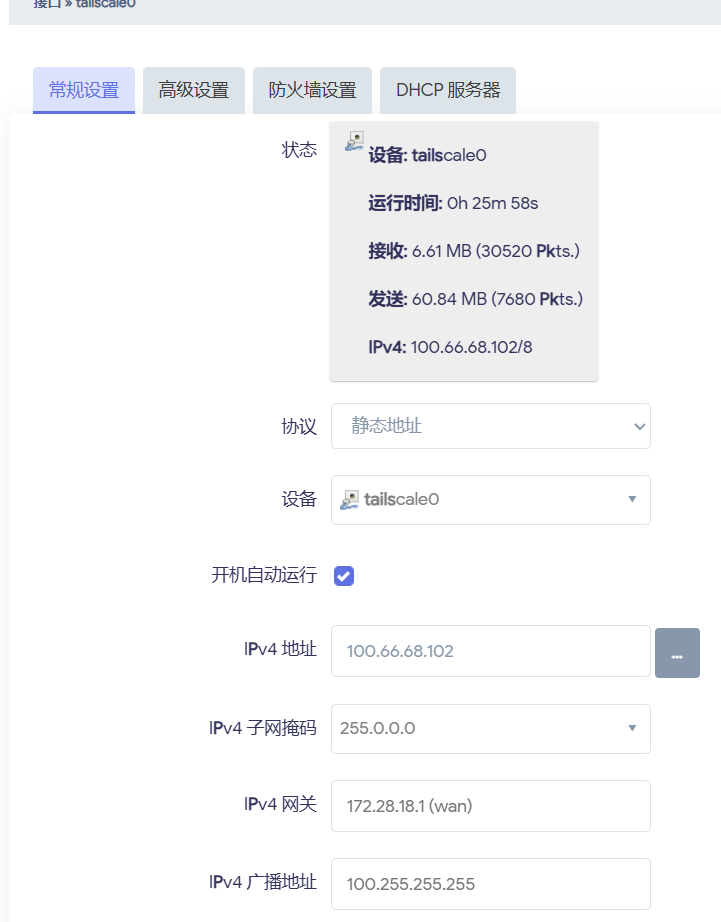
<p>在openwrt 网络-接口 点击添加新接口,名称设置为tailscale0,协议静态地址,设备选择tailscale0,点击确定,然后编辑相关信息,IPV4地址填写控制台中tailscale分配的地址(一般是100.xx.xx.xx),子网掩码填写255.0.0.0.</p>
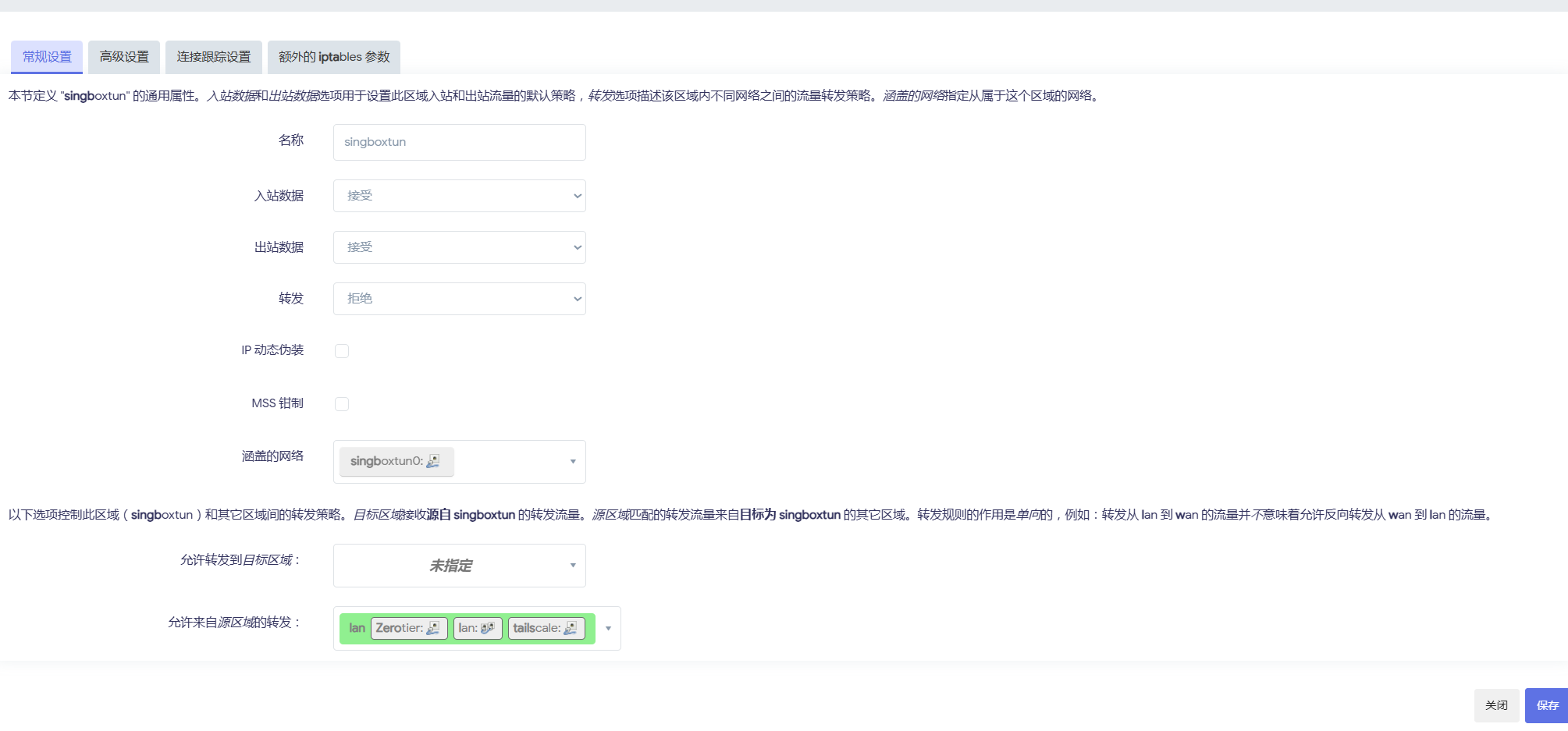
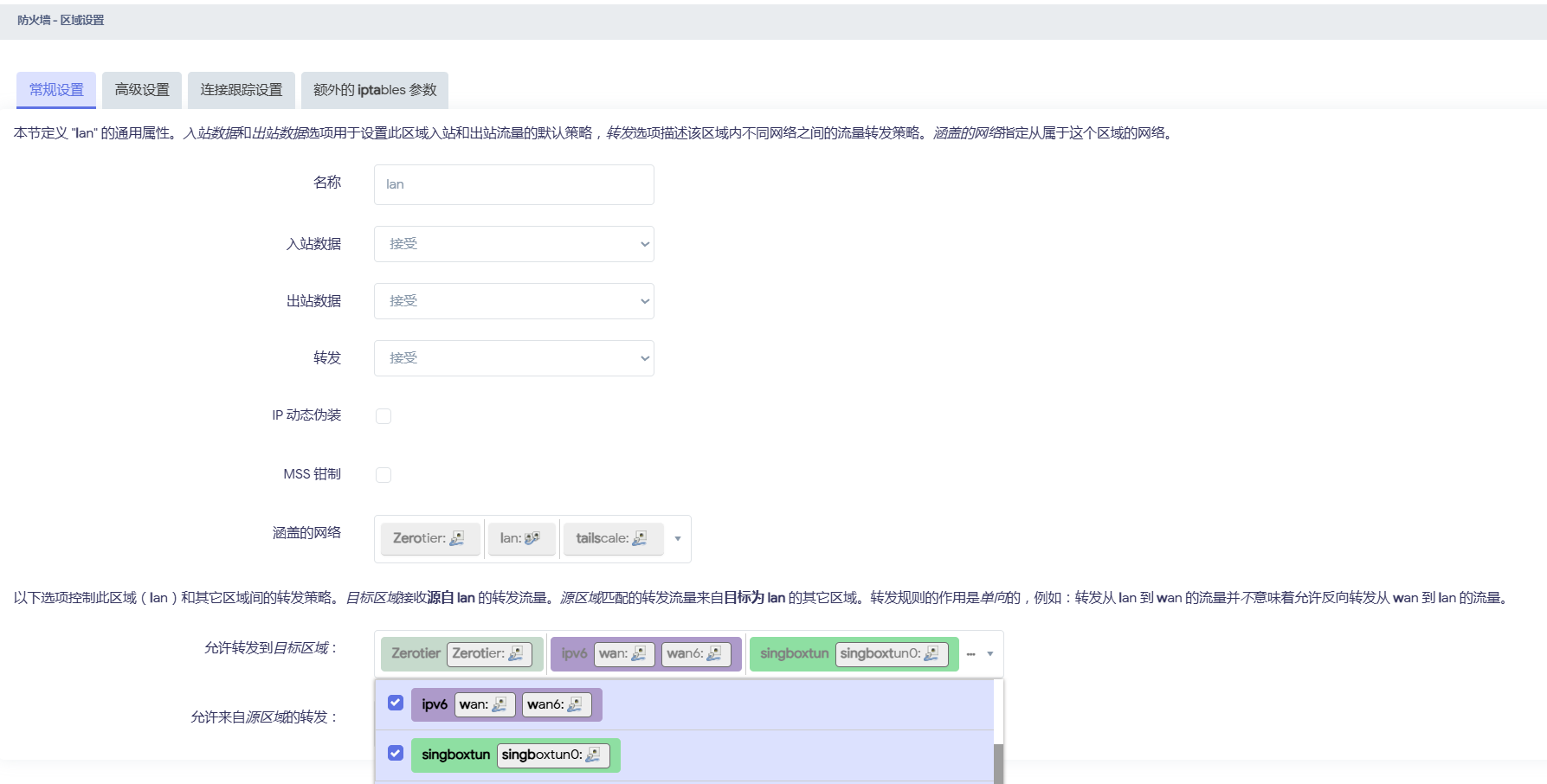
<p>防火墙设置为lan区域(自建一个tailscale区域也可以,效果都是一样的最终)</p>
<p><img src="https://luchetuchuang.oss-cn-beijing.aliyuncs.com/aprimg/image-20240902095448045.png" alt="image-20240902095448045" /></p>
<p>其他无需填写直接保存<img src="https://luchetuchuang.oss-cn-beijing.aliyuncs.com/aprimg/image-20240902095407416.png" alt="image-20240902095407416" /></p>
<h3>防火墙设置</h3>
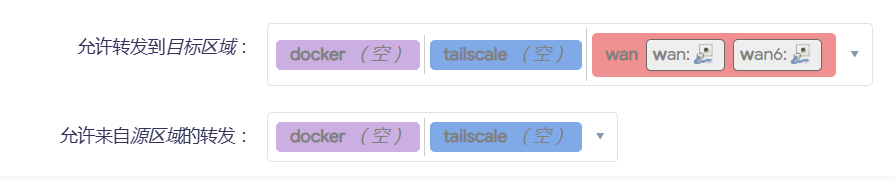
<p>如果你为tailscale单独设置了防火墙区域,前去区域设置为lan添加允许转发的目标区域添加tailscale,允许来自tailscale区域转发也添加上</p>
<p>(图片仅演示,我设置为lan区域)</p>
<p><img src="https://luchetuchuang.oss-cn-beijing.aliyuncs.com/aprimg/image-20240902095609413.png" alt="image-20240902095609413" /></p>
<p>入栈出栈转发均设置为接受.</p>
<h2>添加静态路由</h2>
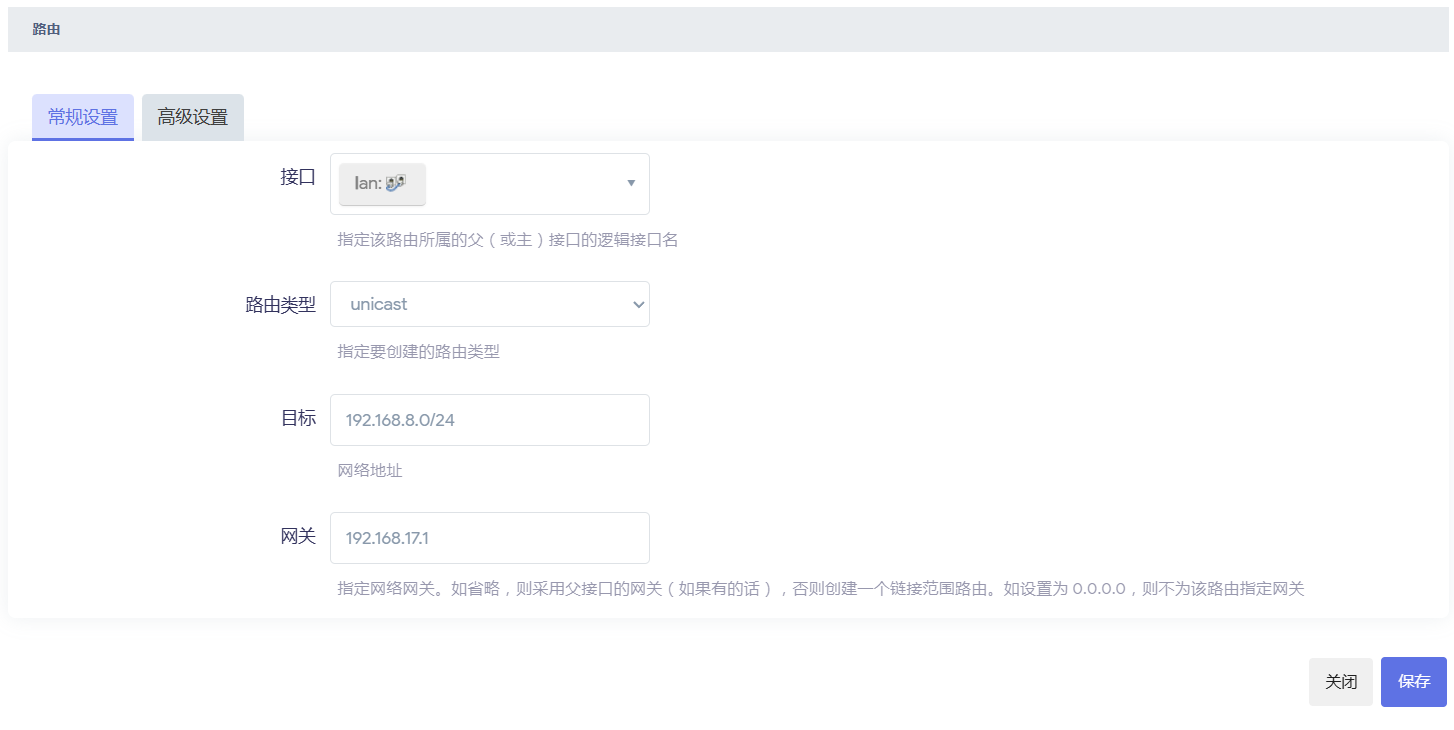
<p>当你的两台路由器均设置了子网路由后(子网路由IP地址不能一致且和你的现实IP地址保持一致)</p>
<p>(两台路由器)在openwrt 网络-&gt;路由-&gt;静态ipv4路由中添加如下</p>
<p><strong>网关是当前路由器设备地址,目标是对方局域网地址(下图为宿舍路由器添加路由)</strong></p>
<p><img src="https://luchetuchuang.oss-cn-beijing.aliyuncs.com/aprimg/image-20240902095834924.png" alt="image-20240902095834924" /></p>
<p>保存后就可以互通了.</p>
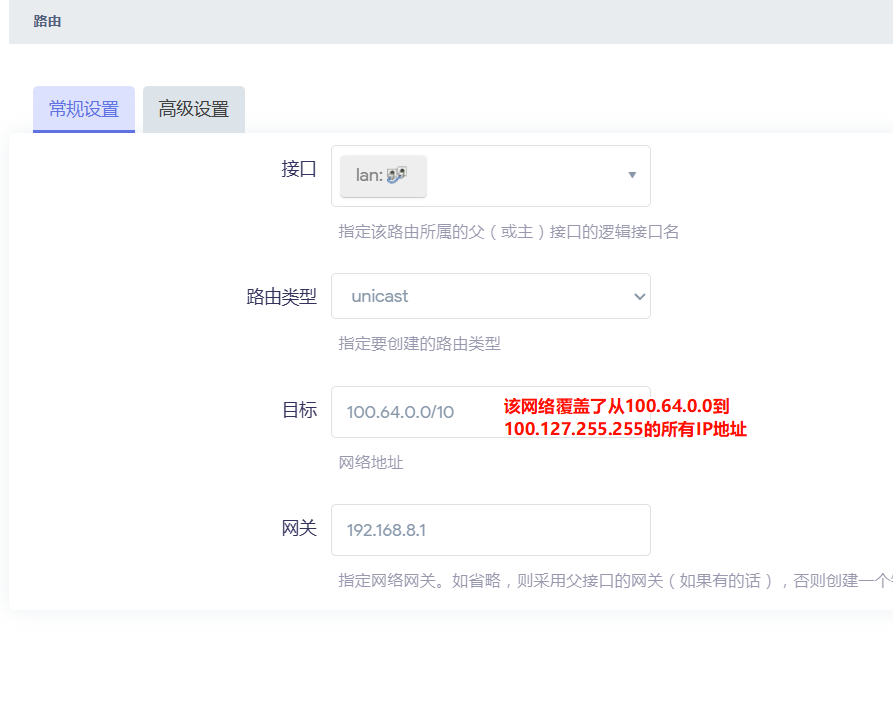
<p>tailscale还让添加一个tailscale地址的静态路由,我感觉没啥影响对我的应用场景,如果你需要添加,则按如下添加(两个路由器填写一致)</p>
<p><img src="https://luchetuchuang.oss-cn-beijing.aliyuncs.com/aprimg/image-20240902100234979.png" alt="image-20240902100234979" /></p>
]]></content>
        <author>
            <name>Aprdec</name>
            <uri>https://wwww.aprdec.top/</uri>
        </author>
        <published>2024-09-02T00:00:00.000Z</published>
    </entry>
    <entry>
        <title type="html"><![CDATA[OpenWrt 使用 sing-box（TUN 模式）进行路由代理教程]]></title>
        <id>https://wwww.aprdec.top/posts/openwrt%E4%BD%BF%E7%94%A8sing-box-tun%E6%A8%A1%E5%BC%8F%E8%BF%9B%E8%A1%8C%E8%B7%AF%E7%94%B1%E4%BB%A3%E7%90%86/</id>
        <link href="https://wwww.aprdec.top/posts/openwrt%E4%BD%BF%E7%94%A8sing-box-tun%E6%A8%A1%E5%BC%8F%E8%BF%9B%E8%A1%8C%E8%B7%AF%E7%94%B1%E4%BB%A3%E7%90%86/"/>
        <updated>2024-08-22T00:00:00.000Z</updated>
        <summary type="html"><![CDATA[家里的软路由一直用的 openclash, 稳定了两年了, 但是 openclash 我的配置一直导致国内网站较慢(国内均为走代理), 不论...]]></summary>
        <content type="html"><![CDATA[<h1>openwrt 使用 sing-box(tun 模式)进行路由代理</h1>
<h2>前言</h2>
<p>家里的软路由一直用的 openclash, 稳定了两年了, 但是 openclash 我的配置一直导致国内网站较慢(国内均为走代理), 不论是 fakeip 还是 Redir-host 模式, 一直在想办法解决国内慢的问题, 但始终不能结局.并且不支持 vless 让我很难受,(meta 说支持了但我自建的在 clash 上没 ping 通过).sing-box 很早我就有所关注, 用过 Android app, 但因为 openwrt 一直没有配套的 luci app, 配置看起来有那么麻烦一直没有在 openwrt 用, 这两天看了油管大佬的视频和 sing-box 的官方文档, 自己也成功在 openwrt 用 sing-box 代理了全部设备的流量, <strong>并且速度很快, 规则设置起来也不太麻烦, 所幸也来写一篇像我这样什么都不懂的人适用的教程.</strong></p>
<p><strong>sing-box 进行网络代理有两种方法 tproxy 和 tun 模式, tproxy 需要修改 iptables/nftables.tun 模式需要创建网络接口和防火墙, 本教程使用 tun 模式</strong></p>
<p><strong>如果需要使用tproxy模式,推荐直接使用shellcrash管理.</strong></p>
<h2>安装 sing-box</h2>
<p>openwrt 可以使用如下命令一键安装 sing-box(不是 alpha 版本)</p>
<p>如果 iptables-nft 安装失败没有影响(至少 tun 模式没有)</p>
<pre><code>opkg install kmod-inet-diag kmod-netlink-diag kmod-tun iptables-nft
opkg install sing-box
</code></pre>
<h2>配置 sing-box</h2>
<p>sing-box 最重要的就是配置了, 小白可能一看到密密麻麻的配置就头疼, 但是阅读一遍也就可以明白个七七八八了, 我这里给出我的配置, 是根据不良林大佬的基础配置改的, 分流十分基础(但是十分好用), 我添加了 steam 和 epic 的规则, <strong>更多规则还要你们自己去发现/编写.</strong></p>
<p>(之后我应该会创建配置模板)</p>
<p><strong>我写了一个根据模板转换 clash 订阅-singbox 配置文件的项目, 可以尝试使用</strong></p>
<p><a href="https://github.com/AprDeci/clash2singbox">AprDeci/clash2singbox: clash 订阅, 节点转换 sing-box (github.com)</a></p>
<p>使用 opkg 安装后在 etc/sing-box/ 文件夹下创建 <strong>config.json</strong></p>
<pre><code>{
    "log": {
        "disabled": false,
        "level": "info",
        "timestamp": true
    },
    "dns": {
        "servers": [
            {
                "tag": "default-dns",
                "address": "223.5.5.5",
                "detour": "direct-out"
            },
            {
                "tag": "system-dns",
                "address": "local",
                "detour": "direct-out"
            },
            {
                "tag": "block-dns",
                "address": "rcode://name_error"
            },
            {
                "tag": "google",
                "address": "https://dns.google/dns-query",
                "address_resolver": "default-dns",
                "address_strategy": "ipv4_only",
                "strategy": "ipv4_only",
                "client_subnet": "1.0.1.0"
            }
        ],
        "rules": [
            {
                "outbound": "any",
                "server": "default-dns"
            },
            {
                "query_type": "HTTPS",
                "server": "block-dns"
            },
            {
                "clash_mode": "direct",
                "server": "default-dns"
            },
            {
                "clash_mode": "global",
                "server": "google"
            },
            {
                "rule_set": "cnsite",
                "server": "default-dns"
            }
        ],
        "strategy": "ipv4_only",
        "disable_cache": false,
        "disable_expire": false,
        "independent_cache": false,
        "final": "google"
    },
    "inbounds": [
        {
            "type": "tun",
            "tag": "tun-in",
            "interface_name": "tun0",
            "inet4_address": "172.19.0.1/30",
            "mtu": 9000,
            "gso": true,
            "auto_route": true,
            "stack": "system",
            "sniff": true,
            "sniff_override_destination": false
         }
    ],
    "outbounds": [
			  {
			  "type": "direct",
			  "tag": "direct-out",
			  "routing_mark": 100
			},
			{
			  "type": "block",
			  "tag": "block-out"
			},
			{
			  "type": "dns",
			  "tag": "dns-out"
			},
			{
			  "type": "urltest",
			  "tag": "自动选择",
			  "outbounds": [
				"香港",
				"日本",
				"美国"
			  ]
			},
			{
			  "type": "selector",
			  "tag": "手动选择",
			  "outbounds": [
				"direct-out",
				"block-out",
				"自动选择",
				"香港",
				"日本",
				"美国"
			  ],
			  "default": "自动选择"
			},
			{
			  "type": "selector",
			  "tag": "GLOBAL",
			  "outbounds": [
				"direct-out",
				"香港",
				"日本",
				"美国"
			  ],
			  "default": "手动选择"
			},
			{
			  "type": "shadowsocks",
			  "tag": "香港",
			  "routing_mark": 100,
			  "server": "abc.com",
			  "server_port": 10001,
			  "password": "fdc43e321a",
			  "method": "aes-128-gcm"
			},
			{
			  "type": "shadowsocks",
			  "tag": "日本",
			  "routing_mark": 100,
			  "server": "abc.com",
			  "server_port": 10002,
			  "password": "fdc43e321a",
			  "method": "aes-128-gcm"
			},
			{
			  "type": "shadowsocks",
			  "tag": "美国",
			  "routing_mark": 100,
			  "server": "abc.com",
			  "server_port": 10003,
			  "password": "fdc43e321a",
			  "method": "aes-128-gcm"
			}
    ],
    "route": {
        "rules": [
            {
                "inbound": "dns-in",
                "outbound": "dns-out"
            },
            {
                "protocol": "dns",
                "outbound": "dns-out"
            },
            {
                "protocol": "quic",
                "outbound": "block-out"
            },
            {
                "clash_mode": "direct",
                "outbound": "direct-out"
            },
            {
                "clash_mode": "global",
                "outbound": "GLOBAL"
            },
            {
                "rule_set": [
                    "cnip",
                    "cnsite",
                    "gamecdn"
                ],
                "outbound": "direct-out"
            }
        ],
        "rule_set": [
            {
                "type": "remote",
                "tag": "cnip",
                "format": "binary",
                "url": "https://github.com/MetaCubeX/meta-rules-dat/raw/sing/geo-lite/geoip/cn.srs",
                "download_detour": "自动选择"
            },
            {
                "type": "remote",
                "tag": "cnsite",
                "format": "binary",
                "url": "https://github.com/MetaCubeX/meta-rules-dat/raw/sing/geo-lite/geosite/cn.srs",
                "download_detour": "自动选择"
            },
            {
                "type":"remote",
                "tag":"gamecdn",
                "format":"source",
                "url":"https://raw.githubusercontent.com/AprDeci/singbox-ruleset/main/game-cdn.json",
                "download_detour":"自动选择"
            }
        ],
        "auto_detect_interface": true,
        "final": "手动选择"
    },
    "experimental":{
        "cache_file": {
            "path": "cache.db",
            "cache_id": "cache_id",
            "store_fakeip": true,
            "enabled": true
        },
            "clash_api": {
            "external_controller": "192.168.8.1:9090",
            "external_ui": "ui",
            "external_ui_download_url": "",
            "external_ui_download_detour": "",
            "secret": "",
            "default_mode": ""
        }
    }
}
</code></pre>
<p><strong>我为小白具体讲解几个关键点, 更多配置信息, 还需要去官方文档查看.</strong></p>
<p>tproxy 和 tun 模式最重要的就是 inbounds 的配置, 像我给出的 inbounds 既是创建 tun 虚拟接口, 取名为 "tun0".(其余内容无需修改)</p>
<p>dns.servers 即为指定 singbox dns 服务器地址, "google" 即为远程 dns 地址, 可以自行修改</p>
<p>route.rules 即为规则指定 outbounds, 这里的 outbounds 即为 clash 中的策略组和节点.</p>
<p>route.rule_set 即为规则集, 可以是 inline 和远程或本地模式</p>
<p>experimental.cache_file 用来缓存 dns 记录</p>
<p>experimental.clash_api 是开启 clash 风格 api, sing-box 默认 meta-yacd 面板.开启后浏览器输入 experimental.clash_api.external_controller 的地址即可跳转到面板修改节点</p>
<h3>你需要做的</h3>
<p>你需要做的就是将自己的节点信息填写在 outbounds 里, 并且修改策略组包含的节点信息.(可以先一键转换复制到里面, 也可以直接使用转换的配置, 修改 inbounds 等其他配置即可)</p>
<h2>启动 sing-box</h2>
<p>配置完成后输入</p>
<pre><code> sing-box check -c /etc/sing-box/config.json
</code></pre>
<p>倘若没有错误输出, 使用如下命令即可启动 sing-box(这时还无法代理局域网设备)</p>
<pre><code> sing-box run -c /etc/sing-box/config.json
</code></pre>
<p>输入如下命令设置 sing-box 自启动</p>
<pre><code>/etc/init.d/sing-box enable
/etc/init.d/sing-box start
</code></pre>
<p>修改/etc/init.d/sing-box 文件(opkg 安装会自动创建, 其他方法请自行创建), 直接覆盖</p>
<pre><code>#!/bin/sh /etc/rc.common
#
# Copyright (C) 2022 by nekohasekai &lt;contact-sagernet@sekai.icu&gt;
#
# This program is free software: you can redistribute it and/or modify
# it under the terms of the GNU General Public License as published by
# the Free Software Foundation, either version 3 of the License, or
# (at your option) any later version.
#
# This program is distributed in the hope that it will be useful,
# but WITHOUT ANY WARRANTY; without even the implied warranty of
# MERCHANTABILITY or FITNESS FOR A PARTICULAR PURPOSE.  See the
# GNU General Public License for more details.
#
# You should have received a copy of the GNU General Public License
# along with this program. If not, see &lt;http://www.gnu.org/licenses/&gt;.
#

START = 99
USE_PROCD = 1

#####  ONLY CHANGE THIS BLOCK  ######
PROG =/usr/bin/sing-box
RES_DIR =/etc/sing-box/ # resource dir / working dir / the dir where you store ip/domain lists
CONF =./config.json   # where is the config file, it can be a relative path to $RES_DIR
#####  ONLY CHANGE THIS BLOCK  ######

start_service() {
  sleep 10
  procd_open_instance
  procd_set_param command $PROG run -D $ RES_DIR -c $CONF

  procd_set_param user root
  procd_set_param limits core = "unlimited"
  procd_set_param limits nofile = "1000000 1000000"
  procd_set_param stdout 1
  procd_set_param stderr 1
  procd_set_param respawn "${respawn_threshold:-3600}" "${respawn_timeout:-5}" "${respawn_retry:-5}"
  procd_close_instance
  iptables -I FORWARD -o tun+ -j ACCEPT
  echo "sing-box is started!"
}

stop_service() {
  service_stop $PROG
  iptables -D FORWARD -o tun+ -j ACCEPT
  echo "sing-box is stopped!"
}

reload_service() {
  stop
  sleep 5s
  echo "sing-box is restarted!"
  start
}
</code></pre>
<h2>添加接口和防火墙</h2>
<p>启动 sing-box 后, 还需添加网络接口(仅 tun 模式), 如图设置, 设备名称和配置中 tun 设备名称一致</p>
<p><img src="https://luchetuchuang.oss-cn-beijing.aliyuncs.com/aprimg/image-20240710102816514.png" alt="image-20240710102816514" /></p>
<p>防火墙添加区域</p>
<p><img src="https://luchetuchuang.oss-cn-beijing.aliyuncs.com/aprimg/image-20240710102928886.png" alt="image-20240710102928886" /></p>
<p>再设置 lan 区域转发 <img src="https://luchetuchuang.oss-cn-beijing.aliyuncs.com/aprimg/image-20240710103009694.png" alt="image-20240710103009694" /></p>
<p>一切都设置完之后, 你的局域网设备就都被代理了</p>
<h2>参考文章</h2>
<p><a href="https://bulianglin.com/archives/singbox.html">【瑞士军刀】放弃 fakeip，拥抱 realip，最强网络代理工具 sing-box 新手指南，从此不知 DNS 泄漏/DNS 污染为何物，软路由插件 homeproxy，奈飞 DNS 解锁、sniff 流量嗅探覆写解析 - 科学上网 技术分享 (bulianglin.com)</a></p>
<p><a href="https://github.com/rezconf/Sing-box/wiki/How-to-Run">How to Run · rezconf/Sing-box Wiki (github.com)</a></p>
<p><a href="https://www.youtube.com/watch?v=2GjgLSgj4MY&amp;t=1297s">【配置分享】sing-box 全配置分享、Proxies URI；Selector 详细配置使用 (youtube.com)</a></p>
]]></content>
        <author>
            <name>Aprdec</name>
            <uri>https://wwww.aprdec.top/</uri>
        </author>
        <published>2024-08-22T00:00:00.000Z</published>
    </entry>
    <entry>
        <title type="html"><![CDATA[企业微信应用消息通知与被动回调回复最近做了什么]]></title>
        <id>https://wwww.aprdec.top/posts/%E4%BC%81%E4%B8%9A%E5%BE%AE%E4%BF%A1%E5%BA%94%E7%94%A8%E6%B6%88%E6%81%AF%E9%80%9A%E7%9F%A5%E4%B8%8E%E8%A2%AB%E5%8A%A8%E5%9B%9E%E8%B0%83%E5%9B%9E%E5%A4%8D%E6%9C%80%E8%BF%91%E5%81%9A%E4%BA%86%E4%BB%80%E4%B9%88/</id>
        <link href="https://wwww.aprdec.top/posts/%E4%BC%81%E4%B8%9A%E5%BE%AE%E4%BF%A1%E5%BA%94%E7%94%A8%E6%B6%88%E6%81%AF%E9%80%9A%E7%9F%A5%E4%B8%8E%E8%A2%AB%E5%8A%A8%E5%9B%9E%E8%B0%83%E5%9B%9E%E5%A4%8D%E6%9C%80%E8%BF%91%E5%81%9A%E4%BA%86%E4%BB%80%E4%B9%88/"/>
        <updated>2024-06-26T00:00:00.000Z</updated>
        <summary type="html"><![CDATA[最近用python写了一个抖音监控的软件,使用了企业微信的机器人进行通知.具体实现就是爬虫和轮询监听视频列表. 在写企业微信应用回调的时候...]]></summary>
        <content type="html"><![CDATA[<h1>企业微信应用消息通知与被动回调回复&amp;&amp;最近做了什么</h1>
<h2>企业微信应用消息通知与被动回调回复</h2>
<p>最近用python写了一个抖音监控的软件,使用了企业微信的机器人进行通知.具体实现就是爬虫和轮询监听视频列表.</p>
<p>在写企业微信应用回调的时候,发现官方文档写的让我感觉不太舒服,网上能搜索到的资料也不太多,所以在这里把自己的理解记录一下</p>
<p><strong>一切的前提是你会注册企业微信并且创建应用</strong></p>
<p>以下是一些有用的文档</p>
<ul>
<li><a href="https://developer.work.weixin.qq.com/document/path/90664">开发前必读 - 文档 - 企业微信开发者中心 (qq.com)</a></li>
</ul>
<p>一切功能的前提</p>
<p><a href="https://developer.work.weixin.qq.com/document/path/91039">获取access_token - 接口文档 - 企业微信开发者中心 (qq.com)</a></p>
<h3>最基础的主动发送通知</h3>
<p><a href="https://developer.work.weixin.qq.com/document/path/90248">应用推送消息 - 文档 - 企业微信开发者中心 (qq.com)</a></p>
<p>该文档记录了所有类型的回复模板,还是比较简单的,根据官方给的请求示例构建一下参数就可以.</p>
<p><a href="https://github.com/GentleCP/corpwechatbot">GentleCP/corpwechatbot: 企业微信的python封装接口，简易上手，开箱即用，一行代码实现消息推送)</a></p>
<p>这是一个封装好的Python库,主动消息发送起来很方便.</p>
<h3>回调功能</h3>
<p>难点在回调功能,涉及到加解密以及要求回复的格式是XML</p>
<p>接受消息需要加解密参数,官方说明如下:</p>
<p><a href="https://developer.work.weixin.qq.com/document/path/90968">加解密方案说明 - 文档 - 企业微信开发者中心 (qq.com)</a></p>
<p>这里推荐<strong>使用官方人员提供的测试案例的工具类进行加解密</strong></p>
<p><a href="https://developer.work.weixin.qq.com/document/path/90307">加解密库下载与返回码 - 文档 - 企业微信开发者中心 (qq.com)</a></p>
<p>这里提供了几个常见语言的加解密库,可以直接使用.</p>
<p>当然,如果你和我一样是小白的话,我相信你看到目前还是一头雾水,解密然后呢,这里我推荐阅读官方提供的案例</p>
<p><a href="https://github.com/sbzhu/weworkapi_python/tree/master/callback">weworkapi_python/callback at master · sbzhu/weworkapi_python (github.com)</a></p>
<p>下面我将讲述如何快速开发接收消息并回复的功能,我使用fastApi进行举例</p>
<p>1.验证企业微信应用服务器有效性,路径都是根目录'/'</p>
<p><img src="https://luchetuchuang.oss-cn-beijing.aliyuncs.com/aprimg/image-20240622214549493.png" alt="image-20240622214549493" /></p>
<pre><code>@app.get("/")
async def Verify(msg_signature: str, timestamp: str, nonce: str, echostr: str):
    sVerifyMsgSig = msg_signature
    sVerifyTimeStamp = timestamp
    sVerifyNonce = nonce
    sVerifyEchoStr = echostr
    # 使用官方解密库确认有效性
    ret, sReplyEchoStr = wxcpt.VerifyURL(sVerifyMsgSig, sVerifyTimeStamp,sVerifyNonce,sVerifyEchoStr)
    if( ret!=0 ):
        print("ERR: DecryptMsg ret: " + str(ret))
        sys.exit(1)
    return int(sReplyEchoStr)
</code></pre>
<p>2.接收消息</p>
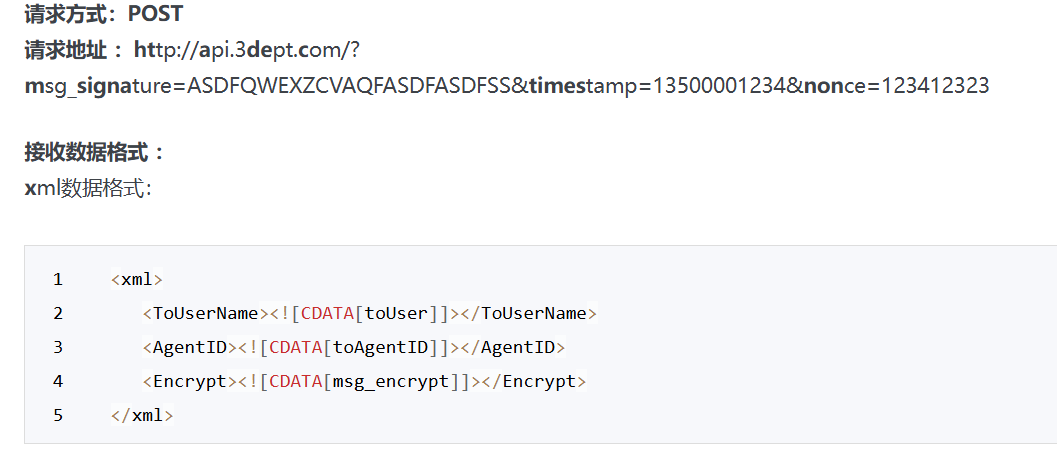
<p><img src="https://luchetuchuang.oss-cn-beijing.aliyuncs.com/aprimg/image-20240622214737308.png" alt="image-20240622214737308" /></p>
<p><img src="https://luchetuchuang.oss-cn-beijing.aliyuncs.com/aprimg/image-20240622214924546.png" alt="image-20240622214924546" /></p>
<pre><code># 接受消息模版
Recived_Temp = """&lt;xml&gt; 
   &lt;ToUserName&gt;&lt;![CDATA[%(ToUserName)s]]&gt;&lt;/ToUserName&gt;
   &lt;AgentID&gt;&lt;![CDATA[%(AgentID)s]]&gt;&lt;/AgentID&gt;
   &lt;Encrypt&gt;&lt;![CDATA[%(Encrypt)s]]&gt;&lt;/Encrypt&gt;
&lt;/xml&gt;"""

@app.post("/")
async def main(msg_signature: str, timestamp: str, nonce: str, q: str = None, item: Item = Depends(XmlBody(Item))):
    Recived_dict = {
        'ToUserName': item.ToUserName,
        'AgentID': item.AgentID,
        'Encrypt': item.Encrypt,
            }
    ReqData = Recived_Temp % Recived_dict
    ret,sMsg=wxcpt.DecryptMsg(sPostData=ReqData, sMsgSignature=msg_signature, sTimeStamp=timestamp, sNonce=nonce)
    if( ret!=0 ):
        print("ERR: DecryptMsg ret: " + str(ret))
        sys.exit(1)
    xml_tree = ET.fromstring(sMsg)
    MsgType = xml_tree.find("MsgType").text
    # msg类型
    if MsgType == "text":
        print("text")
        content_recived = xml_tree.find("Content").text
        FromUserName = xml_tree.find("FromUserName").text
        ToUserName = xml_tree.find("ToUserName").text
        sRespData = func.handle_msg(to_user_id = ToUserName, recived_msg = content_recived,from_user_id=FromUserName,time=timestamp)
        ret,sEncryptMsg=wxcpt.EncryptMsg(sReplyMsg = sRespData, sNonce = nonce, timestamp = timestamp)
        return sEncryptMsg
    # 点击事件
    elif MsgType == "event":
        print("event")
        Event = xml_tree.find("Event").text
        if Event == "click":
            print("CLICK")
            EventKey = xml_tree.find("EventKey").text
            print(EventKey)
            FromUserName = xml_tree.find("FromUserName").text
            ToUserName = xml_tree.find("ToUserName").text
            sRespData = func.handle_msg(to_user_id = ToUserName, recived_msg = EventKey,from_user_id=FromUserName,time=timestamp)
            ret,sEncryptMsg=wxcpt.EncryptMsg(sReplyMsg = sRespData, sNonce = nonce, timestamp = timestamp)
            return sEncryptMsg
</code></pre>
<p>这里通过解析发送消息XML模板获得数据,MsgType代表了数据的类型.func.handle_msg是我用来构造回复XML格式的方法,消息类型的判断也可以放在func中,具体怎么抽象方法还看你们.</p>
<p>handle_msg方法  （这里以我只发送click事件和文字消息举例)</p>
<pre><code>Send_vedio_Temp="""
&lt;xml&gt;
   &lt;ToUserName&gt;%(ToUserName)s&lt;/ToUserName&gt;
   &lt;FromUserName&gt;%(FromUserName)s&lt;/FromUserName&gt; 
   &lt;CreateTime&gt;%(timestamp)s&lt;/CreateTime&gt;
   &lt;MsgType&gt;video&lt;/MsgType&gt;
   &lt;Video&gt;
       &lt;MediaId&gt;%(MediaId)s&lt;/MediaId&gt;
       &lt;Title&gt;%(Title)s&lt;/Title&gt;
       &lt;Description&gt;%(Description)s&lt;/Description&gt;
   &lt;/Video&gt;
&lt;/xml&gt;
"""

#发送消息模版
Send_Temp = """&lt;xml&gt;
   &lt;ToUserName&gt;%(ToUserName)s&lt;/ToUserName&gt;
   &lt;FromUserName&gt;%(FromUserName)s&lt;/FromUserName&gt; 
   &lt;CreateTime&gt;%(timestamp)s&lt;/CreateTime&gt;
   &lt;MsgType&gt;text&lt;/MsgType&gt;
   &lt;Content&gt;%(content)s&lt;/Content&gt;
&lt;/xml&gt;"""

def handle_msg(to_user_id: str, recived_msg: str,from_user_id:str,time):
    name = to_user_id
    if '/get' in recived_msg:
        Send_dict = {
            "ToUserName": to_user_id,
            "FromUserName": from_user_id,
            "timestamp": time,
            "content": "ababab",
        }
        return Send_Temp % Send_dict
    elif '/video' in recived_msg  or 'random_video' in recived_msg:
        download_video_thread = threading.Thread(target=download_video)
        download_video_thread.start()
        download_video_thread.join()
        parent_directory_path = os.path.dirname(os.path.dirname(os.path.abspath(__file__)))
        media_id =uploadfile(parent_directory_path,'video.mp4')
       	send_dic={
                "ToUserName": to_user_id,
                "FromUserName": from_user_id,
                "timestamp": time,
                "MediaId": media_id,
                "Title": title,
                "Description": tags
        }
        return Send_vedio_Temp % send_dic
</code></pre>
<p><strong>思路就是解析消息内容,根据类型和关键字构造返回消息内容</strong></p>
<p>下面这个文档可以查看消息格式类型</p>
<p><a href="https://developer.work.weixin.qq.com/document/path/90241">被动回复消息格式 - 文档 - 企业微信开发者中心 (qq.com)</a></p>
<h2>最近做了什么</h2>
<h3>小组作业</h3>
<p>最近一星期都在写小组作业,Springboot3+Vue3写一个招聘网站,一带四.界面模仿BOSS招聘写的.</p>
<p>写着写着突然感觉自己更想写一些底层的东西.希望自己未来有能力实现吧</p>
<p><img src="https://luchetuchuang.oss-cn-beijing.aliyuncs.com/aprimg/image-20240626184932182.png" alt="image-20240626184932182" /></p>
]]></content>
        <author>
            <name>Aprdec</name>
            <uri>https://wwww.aprdec.top/</uri>
        </author>
        <published>2024-06-26T00:00:00.000Z</published>
    </entry>
    <entry>
        <title type="html"><![CDATA[新的学期]]></title>
        <id>https://wwww.aprdec.top/posts/%E6%96%B0%E7%9A%84%E5%AD%A6%E6%9C%9F/</id>
        <link href="https://wwww.aprdec.top/posts/%E6%96%B0%E7%9A%84%E5%AD%A6%E6%9C%9F/"/>
        <updated>2024-04-30T00:00:00.000Z</updated>
        <summary type="html"><![CDATA[开学两个月了,一直打算写一写关于我的生活的博客,而不只是关于技术相关的.趁着五一假期,正好坐下来认真写一写开学两个月的生活. 已经大三下学期...]]></summary>
        <content type="html"><![CDATA[<h1>新的学期</h1>
<p>开学两个月了,一直打算写一写关于我的生活的博客,而不只是关于技术相关的.趁着五一假期,正好坐下来认真写一写开学两个月的生活.</p>
<p>已经大三下学期了,到了这个时候,除了准备考研似乎什么都不重要了.也有可能我的班级比较卷,让我感觉身边的人都在拼命地学习,当然我也是.</p>
<p>从小到大都被人夸聪明,一直都是班里的前几名,但一直达不到头部,高考也只考了普通一本,这次考研我很想努努力,考一个更好的学校.也有可能考不上吧,但至少现在还在努力.</p>
<p>&lt;img src="https://luchetuchuang.oss-cn-beijing.aliyuncs.com/aprimg/da6d41c6f6dd2630b6ef8c4fae39e1a.jpg" alt="da6d41c6f6dd2630b6ef8c4fae39e1a" style="zoom:33%;" /&gt;</p>
<p>前几天有个学弟加我,说是在Github上找到的我(好奇他怎么找到我的微信),向我咨询工作问题(哈哈,博主都还没工作).很多人看了我的Github肯定以为我要做前端了,但我还是更喜欢后端,并且也一直在学习,只是后端上学习的内容没什么可展示的(目前学习的还是太浅薄),所以也很少写相关的东西</p>
<h2>最近在做什么</h2>
<p>最近在搞自己的音乐库.我特别喜欢听歌,平时看网页,学习都会听歌,(看下面的图片也看得出来我真的很爱)平时常用QQ音乐,但很多喜欢的歌只在网易云有,黑胶会员过期也懒得冲了,所以打算搞一搞音乐库.</p>
<p>&lt;img src="https://luchetuchuang.oss-cn-beijing.aliyuncs.com/aprimg/279934ffd8bc491dd99d8ecefac2b9f.png" alt="279934ffd8bc491dd99d8ecefac2b9f" style="zoom:33%;" /&gt;</p>
<p>服务端软件使用的emby,手机APP用的**[音流]**,为了搞资源,花了20块买了两个网站的会员.音流是国人开发的APP,我用了一个星期感觉很多细节还是不太完美,也有很多小毛病,用起来不如市面上的音乐app顺滑,当然作者更新频率还可以,基本保证一个月至少一更.(而且作者用的是魅族20,专门适配了状态栏歌词,本魅族老用户表示十分开心.)</p>
<p>&lt;img src="https://luchetuchuang.oss-cn-beijing.aliyuncs.com/aprimg/b05f04607c9f3bf8d14e6077ba1c676.jpg" alt="b05f04607c9f3bf8d14e6077ba1c676" style="zoom:33%;" /&gt;&lt;img src="https://luchetuchuang.oss-cn-beijing.aliyuncs.com/aprimg/08d734a5d670d2fc29e3eb722bf1965.jpg" alt="08d734a5d670d2fc29e3eb722bf1965" style="zoom:33%;" /&gt;</p>
<p>关于音乐库如果以后可以我会专门写一篇博客来介绍我的经验,包括资源网站和音乐刮削相关,这里吐槽一句,音乐刮削可真不好整啊.</p>
<h2>接着想做什么</h2>
<p>博客第一次和别人交换了友链,并且是一名大佬.相信能看到我的博客的人80%都看过他的博客,看了他的博客让我对自己的博客感到不满,Sakura主题十分美观,可是现在我却觉得有些花里胡哨了,并且字体太小了不方便阅读,所以打算修改一下主题的样式,让博客更加便于阅读.</p>
]]></content>
        <author>
            <name>Aprdec</name>
            <uri>https://wwww.aprdec.top/</uri>
        </author>
        <published>2024-04-30T00:00:00.000Z</published>
    </entry>
    <entry>
        <title type="html"><![CDATA[python解密下载m3u8视频]]></title>
        <id>https://wwww.aprdec.top/posts/python%E8%A7%A3%E5%AF%86%E4%B8%8B%E8%BD%BDm3u8%E8%A7%86%E9%A2%91/</id>
        <link href="https://wwww.aprdec.top/posts/python%E8%A7%A3%E5%AF%86%E4%B8%8B%E8%BD%BDm3u8%E8%A7%86%E9%A2%91/"/>
        <updated>2024-04-06T00:00:00.000Z</updated>
        <summary type="html"><![CDATA[寒假爬虫学习了一下,然后拖啊拖啊,就到了清明节了. .m3u8文件内容其实就是一整个视频被切割成了N个.ts文件,通过逐个加载其中的ts文件...]]></summary>
        <content type="html"><![CDATA[<h1>python解密下载M3U8视频</h1>
<p>寒假爬虫学习了一下,然后拖啊拖啊,就到了清明节了.</p>
<h2>m3u8文件内容</h2>
<p>.m3u8文件内容其实就是一整个视频被切割成了N个.ts文件,通过逐个加载其中的ts文件来播放视频(肯定不准确,就这么理解吧)</p>
<blockquote>
<p>与传统的视频格式不同，M3U8视频格式将整个视频<strong>分成多个小片段进行传输</strong>，这些小片段可以根据网络情况自动调节其质量和大小。这种方式使得M3U8视频格式非常适合在网络环境不稳定或带宽不足的情况下播放视频。</p>
<p>另外，M3U8视频格式还支持多种分辨率和比特率，以及字幕和音轨等多种附加信息。这些功能都使得M3U8视频格式成为了现代流媒体领域中的一种重要技术。</p>
<p>总的来说，M3U8视频格式具有高<strong>效、灵活、可扩展</strong>等优点，因此被越来越多的视频网站和应用所采用。如果您想深入了解M3U8视频格式，接下来我们将介绍如何解析M3U8视频地址，以及如何使用M3U8视频播放器播放这些视频文件。</p>
</blockquote>
<p>每一个M3U8文件开头,都有如下几行<img src="https://luchetuchuang.oss-cn-beijing.aliyuncs.com/aprimg/image-20240406213010175.png" alt="image-20240406213010175" /></p>
<p><strong>EXT-X-KEY</strong>后面的信息即为M3U8加解密相关的内容.<strong>METHOD</strong>指<strong>加密方式</strong>(如图是AES-128),<strong>URI</strong>的内容即为该文件解密的<strong>key文件地址</strong>,<strong>IV</strong>为该文件<strong>加密偏移量</strong></p>
<p><img src="https://luchetuchuang.oss-cn-beijing.aliyuncs.com/aprimg/image-20240406213314761.png" alt="image-20240406213314761" /></p>
<p>下面的就是各.ts文件的地址</p>
<h2>python代码</h2>
<p>大致思路是</p>
<blockquote>
<p>获取m3u8文件-&gt;解析文件内容获取秘钥,偏移,加密方式,ts文件地址-&gt;循环获取解密ts文件-&gt;合并ts文件</p>
</blockquote>
<p>爬取网络页面获取m3u8这里不再赘述</p>
<p>加密方式需要提前确定,可以自己先查看是什么加密方式,这里以AES-128为例</p>
<h3>解析m3u8</h3>
<p>使用正则解析获取key和iv</p>
<pre><code># 获取key文件地址
key_url = re.findall('#EXT-X-KEY:METHOD=AES-128,URI="(.*)",IV=', m3u8_data)[0]
# 获取iv
iv = re.findall('#EXT-X-KEY:METHOD=AES-128,URI=".*",IV=(.*)', m3u8_data)[0][:16]
# 获取ts文件地址列表
ts_list = re.sub('#E.*', '', m3u8_data).split()
# 获取key文件内容
key = requests.get(key_url, headers=headers).content
</code></pre>
<h3>解密合并ts</h3>
<p>循环解密下载ts文件地址,并且通过file.write写入到同一个文件既合并</p>
<pre><code># 解码器 Crypto.Cipher
ci = AES.new(key, AES.MODE_CBC, iv=iv.encode())
current = current_process()
pos = current._identity[0] - 1
# 这里使用了tqdm显示进度
for ts in tqdm(ts_list, desc=name,position=pos):
# 加密数据
ts_content = requests.get(ts, headers=headers).content
# 解密数据
content = ci.decrypt(ts_content)
# 保存数据
with open(f'video\\{name}.mp4', 'ab') as f:
	f.write(content)
</code></pre>
]]></content>
        <author>
            <name>Aprdec</name>
            <uri>https://wwww.aprdec.top/</uri>
        </author>
        <published>2024-04-06T00:00:00.000Z</published>
    </entry>
    <entry>
        <title type="html"><![CDATA[三星watch6-flyme非三星安卓系统折腾记]]></title>
        <id>https://wwww.aprdec.top/posts/%E4%B8%89%E6%98%9Fwatch6-flyme%E9%9D%9E%E4%B8%89%E6%98%9F%E5%AE%89%E5%8D%93%E7%B3%BB%E7%BB%9F%E6%8A%98%E8%85%BE%E8%AE%B0/</id>
        <link href="https://wwww.aprdec.top/posts/%E4%B8%89%E6%98%9Fwatch6-flyme%E9%9D%9E%E4%B8%89%E6%98%9F%E5%AE%89%E5%8D%93%E7%B3%BB%E7%BB%9F%E6%8A%98%E8%85%BE%E8%AE%B0/"/>
        <updated>2024-03-22T00:00:00.000Z</updated>
        <summary type="html"><![CDATA[买来这个表最大的感受,不是他多么好看,多么有用,而是,如果你不是三星手机,不愿意折腾,离三星watch系列远一点!别来折磨自己了,何必给个韩...]]></summary>
        <content type="html"><![CDATA[<h1>三星watch6 flyme(非三星安卓)系统折腾记</h1>
<p>买来这个表最大的感受,不是他多么好看,多么有用,而是,如果你不是三星手机,不愿意折腾,<strong>离三星watch系列远一点!别来折磨自己了,何必给个韩国公司送钱呢?国产不好吗</strong></p>
<p>所需软件:<a href="https://www.123pan.com/s/dXn0Vv-WmIw3.html">123网盘</a></p>
<p>都是酷安大佬分享的方法,这里只是整合一下软件.</p>
<h2>血压心电图</h2>
<p>安装SHM MOD Companion,跟随里面的指引,按顺序点,安装好手机和手表端修改过的三星健康监测器就可以了.</p>
<h2>微信同步步数</h2>
<p>下载三星健康数据同步插件,然后点<a href="https://www.123pan.com/s/dXn0Vv-WmIw3.html">这个链接</a>,跟着指引就OK啦</p>
<h2>NFC</h2>
<p>下载老版本的三星智能卡,链接里面已经包含了.</p>
<p>我用5.0.65的不行,用5.0.18的可以,你们可以自己试试.</p>
<h2>感受</h2>
<p>破表除了好看点没啥好的(三星用户除外)</p>
<p><img src="https://luchetuchuang.oss-cn-beijing.aliyuncs.com/aprimg/P30812-163943.jpg" alt="P30812-163943" /></p>
]]></content>
        <author>
            <name>Aprdec</name>
            <uri>https://wwww.aprdec.top/</uri>
        </author>
        <published>2024-03-22T00:00:00.000Z</published>
    </entry>
    <entry>
        <title type="html"><![CDATA[校园网(河南农业大学) Openwrt 开启IPV6分发]]></title>
        <id>https://wwww.aprdec.top/posts/%E6%A0%A1%E5%9B%AD%E7%BD%91%E6%B2%B3%E5%8D%97%E5%86%9C%E4%B8%9A%E5%A4%A7%E5%AD%A6-openwrt%E5%BC%80%E5%90%AFipv6%E5%88%86%E5%8F%91/</id>
        <link href="https://wwww.aprdec.top/posts/%E6%A0%A1%E5%9B%AD%E7%BD%91%E6%B2%B3%E5%8D%97%E5%86%9C%E4%B8%9A%E5%A4%A7%E5%AD%A6-openwrt%E5%BC%80%E5%90%AFipv6%E5%88%86%E5%8F%91/"/>
        <updated>2024-02-28T00:00:00.000Z</updated>
        <summary type="html"><![CDATA[校园网(河南农业大学) Openwrt 开启IPV6分发 因为在家里放着NAS,不论是DDNS还是虚拟组网,有IPV6对访问的速度和稳定性都...]]></summary>
        <content type="html"><![CDATA[<p>校园网(河南农业大学) Openwrt 开启IPV6分发</p>
<p>因为在家里放着NAS,不论是DDNS还是虚拟组网,有IPV6对访问的速度和稳定性都有极高的提升,所以尝试寝室网分发IPV6.一般大学都有IPV6</p>
<p><a href="https://ipv6.ha.edu.cn/monitor.html">河南省教育系统IPv6发展监测平台 (ha.edu.cn)</a></p>
<p>不废话直接看图设置<img src="https://luchetuchuang.oss-cn-beijing.aliyuncs.com/aprimg/image-20240228115314718.png" alt="image-20240228115314718" /></p>
<p><img src="https://luchetuchuang.oss-cn-beijing.aliyuncs.com/aprimg/image-20240228115335300.png" alt="image-20240228115335300" /></p>
<p><img src="https://luchetuchuang.oss-cn-beijing.aliyuncs.com/aprimg/image-20240228115347523.png" alt="image-20240228115347523" /></p>
<p><img src="https://luchetuchuang.oss-cn-beijing.aliyuncs.com/aprimg/image-20240228115403003.png" alt="image-20240228115403003" /></p>
<p>Openwrt对应禁止解析IPV6</p>
<p><img src="https://luchetuchuang.oss-cn-beijing.aliyuncs.com/aprimg/image-20240228115441774.png" alt="image-20240228115441774" /></p>
<p>一般设置到这里就会分发了</p>
]]></content>
        <author>
            <name>Aprdec</name>
            <uri>https://wwww.aprdec.top/</uri>
        </author>
        <published>2024-02-28T00:00:00.000Z</published>
    </entry>
    <entry>
        <title type="html"><![CDATA[Diapora主题修复日记]]></title>
        <id>https://wwww.aprdec.top/posts/diapora%E4%B8%BB%E9%A2%98%E4%BF%AE%E5%A4%8D%E6%97%A5%E8%AE%B0/</id>
        <link href="https://wwww.aprdec.top/posts/diapora%E4%B8%BB%E9%A2%98%E4%BF%AE%E5%A4%8D%E6%97%A5%E8%AE%B0/"/>
        <updated>2024-02-17T00:00:00.000Z</updated>
        <summary type="html"><![CDATA[我的环境nginx+PHP8.1+Wordpress6.4.3 很喜欢这个主题,但是年代有些久远,在wordpress6.4.3上有一些问题...]]></summary>
        <content type="html"><![CDATA[<h1>Diapora主题修复日记</h1>
<p>我的环境nginx+PHP8.1+Wordpress6.4.3</p>
<p>很喜欢这个主题,但是年代有些久远,在wordpress6.4.3上有一些问题,于是决定修复+修改</p>
<h2>字数统计</h2>
<p>没有经过修改会提示变量没有初始化</p>
<p><img src="https://luchetuchuang.oss-cn-beijing.aliyuncs.com/aprimg/QQ%E6%88%AA%E5%9B%BE20240216153138.png" alt="QQ截图20240216153138" /></p>
<p>查看源代码发现返回text如果为''会自动获取文章内容经过处理后以UTF-8编码计数<img src="https://luchetuchuang.oss-cn-beijing.aliyuncs.com/aprimg/image-20240216153731740.png" alt="image-20240216153731740" /></p>
<p><img src="https://luchetuchuang.oss-cn-beijing.aliyuncs.com/aprimg/image-20240216153516021.png" alt="image-20240216153516021" /></p>
<p>改为</p>
<pre><code>&lt;span class="icon-letter"&gt;&lt;?php  echo count_words (''); ?&gt;&lt;/span&gt;
</code></pre>
<p>出现如下情况,字体数量逐渐叠加</p>
<p><img src="https://luchetuchuang.oss-cn-beijing.aliyuncs.com/aprimg/QQ%E6%88%AA%E5%9B%BE20240216153301.png" alt="QQ截图20240216153301" /></p>
<p>原因是查看字数函数会拼接$output,output没有刷新.查看函数竟然是因为我为了修复$post,$output没有初始化使用了global,改为</p>
<pre><code>function count_words ($text) {   
    global $post;  
	$output = '';
    if ( '' == $text ) {   
        $text = $post-&gt;post_content;  
		//$text = get_the_content(); 
        if (mb_strlen($output, 'UTF-8') &lt; mb_strlen($text, 'UTF-8')) $output .= '' . mb_strlen(preg_replace('/\s/','',html_entity_decode(strip_tags($post-&gt;post_content))),'UTF-8') . '';   
        return $output;   
    }   
}
</code></pre>
<p>OK啦</p>
<p><img src="https://luchetuchuang.oss-cn-beijing.aliyuncs.com/aprimg/image-20240216154307439.png" alt="image-20240216154307439" /></p>
<h2>随机特色图</h2>
<p>主题本身不支持以API的方式传入随机文章缩略图,而是必须每个文章单独设置特色图或使用统一的默认图,对我这样的懒狗有些不友好</p>
<p>查找源代码(注释为原代码)<img src="https://luchetuchuang.oss-cn-beijing.aliyuncs.com/aprimg/image-20240216154901363.png" alt="image-20240216154901363" /></p>
<p><img src="https://luchetuchuang.oss-cn-beijing.aliyuncs.com/aprimg/image-20240216154600840.png" alt="image-20240216154600840" /></p>
<p>修改img[0]路径即可,注册rest api保证路径统一</p>
<p><img src="https://luchetuchuang.oss-cn-beijing.aliyuncs.com/aprimg/image-20240216155036011.png" alt="image-20240216155036011" /></p>
<h2>样式调整</h2>
<p>首页大图存在拉伸缩放问题,调整为</p>
<pre><code>object-fit:contain;
</code></pre>
<h3>缩略图</h3>
<p>缩略图由于图片大小不同存在高度不一致问题,修改为</p>
<pre><code>object-fit:contain;
height:382.5px;
</code></pre>
<h2>懒加载</h2>
<p>Lazyload.js梭哈</p>
<h2>后台</h2>
<p>使用框架<strong>codestarframework</strong>,提醒一下option framework应该不兼容当前版本,不想自己修的就别用了.</p>
]]></content>
        <author>
            <name>Aprdec</name>
            <uri>https://wwww.aprdec.top/</uri>
        </author>
        <published>2024-02-17T00:00:00.000Z</published>
    </entry>
    <entry>
        <title type="html"><![CDATA[整一台NAS内网穿透方案分享]]></title>
        <id>https://wwww.aprdec.top/posts/%E6%95%B4%E4%B8%80%E5%8F%B0nas%E5%86%85%E7%BD%91%E7%A9%BF%E9%80%8F%E6%96%B9%E6%A1%88%E5%88%86%E4%BA%AB/</id>
        <link href="https://wwww.aprdec.top/posts/%E6%95%B4%E4%B8%80%E5%8F%B0nas%E5%86%85%E7%BD%91%E7%A9%BF%E9%80%8F%E6%96%B9%E6%A1%88%E5%88%86%E4%BA%AB/"/>
        <updated>2024-02-08T00:00:00.000Z</updated>
        <summary type="html"><![CDATA[搞软路由已经满足不了自己了,一直想要整一台NAS,寒假回家有了一些闲钱,于是头脑一热组装了一台8100t的nas,机箱是射手座机箱.我个人玩...]]></summary>
        <content type="html"><![CDATA[<h1>搞一台NAS</h1>
<p>搞软路由已经满足不了自己了,一直想要整一台NAS,寒假回家有了一些闲钱,于是头脑一热组装了一台8100t的nas,机箱是射手座机箱.我个人玩到现在认为NAS最重要的还是cpu,8100t属于性能又不错(相对于all in one),用的人又多,各种功能都有完整的支持和各种教程,选它一定不会出问题.</p>
<h2>系统</h2>
<p>系统首选Unraid了,因为对这个系统的硬盘阵列系统比较感兴趣,并且自己喜欢折腾,虚拟机什么的肯定也要搞一搞,跑跑docker啥的更是经常的事.距离编辑文章(24.2.8),NAS买回来已经有半个月了,除去最初两天一直在调试硬件,系统层面的东西,后面基本稳定运行,前天又加装了一个16g内存条.</p>
<p><img src="https://luchetuchuang.oss-cn-beijing.aliyuncs.com/aprimg/image-20240208131014846.png" alt="image-20240208131014846" /></p>
<h2>黑群晖</h2>
<p>买回来第一件事就是折腾虚拟机黑群晖,用买主机送的一块128G的固态硬盘做了直通,说到这里就有些尴尬,我买了一块10TB的机械硬盘,但不清楚硬盘直通不能挂载,所以主要的影视服务都跑在unraid上,黑群晖目前只用来存存照片,备份一下博客文件.</p>
<h3>虚拟机设置</h3>
<p>下面这篇文章写的已经很清楚了,这个博主写的让我受益良多.</p>
<p><a href="https://zhuanlan.zhihu.com/p/581306504">UNRAID 6.11 安装完美黑群晖 DSM7.X（虚拟化核显、Nvme 补丁等）</a></p>
<h3>相片备份</h3>
<p>用黑群晖主要还是有成熟套件可以备份一些文件很快速,省的自己找软件找APP了,但是相片备份根据我自己的使用还是推荐给大家三款软件,分别是<strong>MT photos,群晖photos,immich</strong>,其中MT photos需要付费,但是体验丝滑流畅,收费也不高,群晖photos需要群晖系统,immich开源免费.三者都支持人物检测,场景检测,标签功能,位置检测.并且APP支持都很完善</p>
<p>三者的功能对我而言都差不多,没有太大的差别,所以我还是用了群晖photos<img src="https://luchetuchuang.oss-cn-beijing.aliyuncs.com/aprimg/image-20240208132425505.png" alt="image-20240208132425505" /></p>
<h1>内网穿透</h1>
<p>NAS离不开的就是内网穿透了,而且我也真的很需要,毕竟我也不会把它带到学校,远程控制就十分重要了,我也使用了多套方案,分类给大家借鉴</p>
<h2>DDNS</h2>
<p>如果有动态公网IPV4或者公网IPV6的首选就是DDNS,在外可以跑满宽带上行.</p>
<p>我家没有公网IPV4但是有IPV6,所以也整了DDNS,我使用的是<strong>DDNS-go</strong>,支持十多家服务商的DDNS服务,并且可以多配置多域名.我的两个域名分别解析在腾讯云和cloudflare上,两个配置就可以很方便的解析好<img src="https://luchetuchuang.oss-cn-beijing.aliyuncs.com/aprimg/image-20240208133202893.png" alt="image-20240208133202893" /></p>
<h2>虚拟组网</h2>
<p>这是除有公网IP外最好的方案了,并且现在虚拟组网技术都比较成熟,打洞效率很高,我自己用的时候没有打洞不成功的,主要还是因为校园网没有IPV6,无法通过DDNS访问我的NAS,所以再加上其他的方案.</p>
<p>我使用的是Zerotier和tailscale,两个虚拟组网的方案不同,但是都是简单好用,而且都可以自建Planet/headscale,如果有一台公网IPV4国内服务器的话,自建一下也能保证打洞不成功时候的基本速率,我在自己的服务器上自建了Zeroter的Planet.</p>
<p>还有一款备受好评的虚拟组网服务名为<strong>Netbird</strong>,大家也可以尝试一下.</p>
<p><strong>以上都可以docker部署</strong></p>
<h2>frp</h2>
<p>frp是借助一台公网服务器来将内网暴露在公网上,可以选择自建frps或者网络上有很多免费/付费的frp服务,平时如果不用于看视频做其他的都绰绰有余,但是网速首先要看服务器的速度,其次是受nas上传速度限制.</p>
<p>frp配置十分简单,只需要修改客户端配置就可以.</p>
<p>我在自己的日本服务器上自建了frps,并且使用了两家免费frp服务,同时跑三个配置.在这里,我也顺便分享下我修改的frpc镜像,可以自动运行多frpc配置.</p>
<p><a href="https://github.com/AprDeci/frpc">AprDeci/frpc (github.com)</a></p>
<h2>Stun内网穿透</h2>
<p>这项技术要求网络类型必须是NAT1,否则不能使用(移动用户可以跳过).</p>
<p>我使用Lucky进行内网穿透</p>
<p><a href="https://lucky666.cn/docs/modules/stun/">STUN内网穿透 | Lucky (lucky666.cn)</a></p>
<p>这项技术**缺点是穿透的地址会变,**并且根据网上的方法绑定域名比较麻烦,但是可以使用lucky自带的webhook搭配微信机器人发送变更的地址.</p>
<p><strong>Lucky还有很多有意思有用的功能,大家可以深入挖掘一下</strong></p>
<p><img src="https://luchetuchuang.oss-cn-beijing.aliyuncs.com/aprimg/b8a4a496615432634695751fe35f60ce.png" alt="b8a4a496615432634695751fe35f60ce" /></p>
<hr />
<p>以上就是我使用的所有内网穿透方案了,具体流程大家需要的话可以网上搜索,都比较简单.</p>
]]></content>
        <author>
            <name>Aprdec</name>
            <uri>https://wwww.aprdec.top/</uri>
        </author>
        <published>2024-02-08T00:00:00.000Z</published>
    </entry>
    <entry>
        <title type="html"><![CDATA[vue3+vant4写堡垒之夜APP学习到的知识]]></title>
        <id>https://wwww.aprdec.top/posts/vue3vant4%E5%86%99%E5%A0%A1%E5%9E%92%E4%B9%8B%E5%A4%9Capp%E5%AD%A6%E4%B9%A0%E5%88%B0%E7%9A%84%E7%9F%A5%E8%AF%86/</id>
        <link href="https://wwww.aprdec.top/posts/vue3vant4%E5%86%99%E5%A0%A1%E5%9E%92%E4%B9%8B%E5%A4%9Capp%E5%AD%A6%E4%B9%A0%E5%88%B0%E7%9A%84%E7%9F%A5%E8%AF%86/"/>
        <updated>2024-01-17T00:00:00.000Z</updated>
        <summary type="html"><![CDATA[<van-nav-bar :title="nn"fixed placeholder/> 文档中说fixed,placeholder接收boo...]]></summary>
        <content type="html"><![CDATA[<h1>Vue3+Vant4写堡垒之夜APP学习到的知识</h1>
<p><code>&lt;van-nav-bar :title="nn" fixed placeholder/&gt;</code></p>
<p>文档中说fixed,placeholder接收boolean值,不论写'true'/true都会报错,实则不用写值,直接写参数名即可</p>
<h2>学习的文章</h2>
<p><a href="https://blog.csdn.net/CooolYvonne/article/details/115254623">卡片布局自适应方案全解析_vue卡片布局-CSDN博客</a></p>
<p><a href="https://juejin.cn/post/7034318820718149668">vue 中 v-for 动态生成盒子换行排列布局效果 - 掘金 (juejin.cn)</a></p>
<p><a href="https://juejin.cn/post/6965488051695353886">🌟 CSS 幻术 | 有关光影效果的黑魔法 - 掘金 (juejin.cn)</a></p>
<p><a href="https://blog.csdn.net/w178191520/article/details/84260915">如何用纯 CSS 创作一个金属光泽 3D 按钮特效_纯css3实现开机按钮 按钮3d有光泽-CSDN博客</a></p>
<p><a href="https://blog.csdn.net/qq_51967017/article/details/131058627">FastApi使用定时任务_fastapi 定时任务-CSDN博客</a></p>
<p><a href="https://www.cnblogs.com/LearningC/p/17336452.html">Ubuntu部署FastApi项目 - 莫问哥哥 - 博客园 (cnblogs.com)</a></p>
<p><a href="https://www.liaoxuefeng.com/wiki/1016959663602400/1019273143120480">venv - 廖雪峰的官方网站 (liaoxuefeng.com)</a></p>
<p><a href="https://blog.csdn.net/doushi/article/details/128762885">Let’s Encrypt SSL 证书的申请与使用_letsencrypt证书申请-CSDN博客</a></p>
<p><a href="https://certbot.eff.org/instructions?ws=nginx&amp;os=ubuntufocal">Certbot Instructions | Certbot (eff.org)</a></p>
<p><a href="https://github.com/chokcoco/iCSS/issues/80">奇妙的 CSS MASK · Issue #80 · chokcoco/iCSS (github.com)</a></p>
<h2>Cloudflare Workers图片反代</h2>
<p>因为商城是爬取的Tracker.fortnite的数据,图片链接也是trackercdn的,导致国内连接比较慢,本来在想要不要用后端爬虫自动存储到服务器中,用服务器传输图片,但终究用到自己服务器的流量,还是双向,真是心疼.所幸在Cloudflare page部署测试页面时候,看到了Workers,并且了解到Workers可以反代资源,于是使用Cloudflare Workers进行反代图片</p>
<p>代码复制的别的博主的</p>
<pre><code>addEventListener('fetch', event =&gt; {
    event.respondWith(handleRequest(event.request))
})

async function handleRequest(request) {
    const imageUrl = new URL(request.url);
    imageUrl.hostname = "源站域名";  // 替换成源站域名
    imageUrl.protocol = "https";  // 源站的http协议

    // 构建新的请求对象
    const imageRequest = new Request(imageUrl, request)

    // 删除 Referer 请求头，也可以使用 imageRequest.headers.set('Referer', '') 修改Referer 
    imageRequest.headers.delete('Referer')

    // 从远程服务器获取响应
    const imageResponse = await fetch(imageRequest)

    // 将响应体作为字节数组读取
    const imageBuffer = await imageResponse.arrayBuffer()

    // 构建新的响应对象
    const response = new Response(imageBuffer, imageResponse)

    // 设置 Content-Type 标头
    response.headers.set('Content-Type', imageResponse.headers.get('Content-Type'))

    // 返回响应对象
    return response
}
</code></pre>
<h2>CSS上的问题</h2>
<h3>文字根据容器大小自动调整Fontsize</h3>
<pre><code>&lt;script setup&gt;
const namedom = ref()
function changefontsize(){
     if(containerdom.value.scrollWidth&gt;containerdom.value.offsetWidth){
         namedom.value.style.fontSize = "10px"
         console.log("dadaddadada")
     }
}
onMounted(() =&gt; {
    changefontsize()
    console.log(containerdom.value.scrollWidth)
})
&lt;/script&gt;
&lt;template&gt;
&lt;div class="shop-card"&gt;
        &lt;img class="item-img" v-lazy=imurl&gt;
        &lt;div class="item-info-container" ref="containerdom"&gt;
        &lt;p class="item-name" ref="namedom"&gt;Festival bundle bundle bundle&lt;/p&gt;
        &lt;p class="item-price"&gt;&lt;img style="width: 20px; vertical-align: middle;" src="@/assets/imgs/vbuck.png" alt=""&gt;1200&lt;/p&gt;
    &lt;/div&gt;
    &lt;/div&gt;
&lt;/template&gt;

&lt;style&gt;
    .item-name{

    color: white;
    letter-spacing: 2px;
    position: relative;
    left: 10px;
}
.item-price{
    font-size: 25px;
    color: white;
    letter-spacing: 2px;
    position: relative;
    left: 10px;
}
.item-info-container{
    position: relative;
    bottom: 110px;
    padding-right: 1px;
    max-width: 200px;
    height: 100%;
    background:#00000055;
    white-space: nowrap;//使文字不折叠
    overflow-x: auto; //获取scroll
}
&lt;/style&gt;
</code></pre>
]]></content>
        <author>
            <name>Aprdec</name>
            <uri>https://wwww.aprdec.top/</uri>
        </author>
        <published>2024-01-17T00:00:00.000Z</published>
    </entry>
</feed>